
Three names dominate every “which SEO plugin” thread: Yoast, Rank Math, and AIOSEO. The first two get most of the attention. The third actually the oldest of the bunch, launched in 2007 quietly powers over three million active websites, and it deserves a harder look than a recommendation recycled from a 2021 forum post.
This review covers everything that goes into that decision: what AIOSEO actually includes free versus paid, how the TruSEO scoring works, real pricing including the renewal catch, the plugin’s effect on page speed, and where it genuinely beats or loses to Yoast and Rank Math. And because a review that ends at “install it and see” isn’t much use, the second half is a complete configuration walkthrough so if you do choose AIOSEO, you’ll have it set up correctly the same day.
What AIOSEO is and how it’s structured
AIOSEO (All in One SEO) has been through multiple owners and a major rebuild since 2007, which is why reviews from 2019 and 2026 can read like they describe different products. The current version is substantially more polished than earlier iterations a sign of active development rather than a plugin coasting on its install count. At 3 million+ active installs it trails Yoast’s 10 million but sits in roughly the same adoption league as Rank Math.
The product runs on a two-track model. The free Lite version from WordPress.org is a real, functional plugin: core on-page SEO controls, TruSEO scoring, XML sitemaps, basic schema, social meta tags, and a robots.txt editor. The paid version, sold at AIOSEO.com in four annual tiers, holds back the advanced modules Local SEO, WooCommerce optimization, the redirection manager, and keyword rank tracking. Lite isn’t a hollow demo, but it is deliberately engineered to show you where the ceiling is.
The plugin’s target audience is notably broad: beginner bloggers, WooCommerce store owners who want product schema handled automatically, and local businesses that need address, hours, and location data appearing correctly in search. It doesn’t assume you know what a canonical tag is before you start which, depending on who you are, is either its best quality or a mild annoyance.
Core features worth knowing about
Schema builder. This is AIOSEO’s clearest competitive strength. The builder supports articles, products, local businesses, reviews, events, and FAQs, all configurable in the editor with no code and it’s more flexible and accessible for non-developers than what Yoast offers natively. For affiliate marketers building review content or small businesses chasing rich results, this alone can justify the plugin.
Sitemaps beyond the basics. The standard Smart XML Sitemap generates and updates automatically, but AIOSEO also ships video sitemaps, Google News sitemaps, RSS sitemaps, and visitor-facing HTML sitemaps. Most blogs only need the standard one, but having the others inside one plugin means no separate add-ons as your content strategy grows.
Local SEO module (Plus plan and above). Business hours, Google Maps integration, contact details, local business schema, and multi-location support. For a brick-and-mortar business trying to rank locally without an agency, this is the feature that most distinguishes AIOSEO from the competition.
WooCommerce SEO (paid). Purpose-built product schema, category page controls, and per-product optimization built for ecommerce rather than adapted from a blogging workflow.
Redirection Manager (paid). 404 monitoring plus redirect management something nearly every site eventually needs, and here it’s bundled rather than a separate plugin.
Search Statistics. Direct Google Search Console integration surfaces query, impression, and click data inside the WordPress dashboard; higher tiers add a rank tracker that monitors position changes for your target keywords over time.
TruSEO: the on-page score, honestly assessed
TruSEO is AIOSEO’s real-time scoring system every post gets a score out of 100 based on focus keyphrase usage, readability, and whether the technical on-page elements (title, meta description, alt text) are in place. Beginners tend to find a numerical score easier to act on than a vague checklist: get above 70 before publishing is a concrete goal.
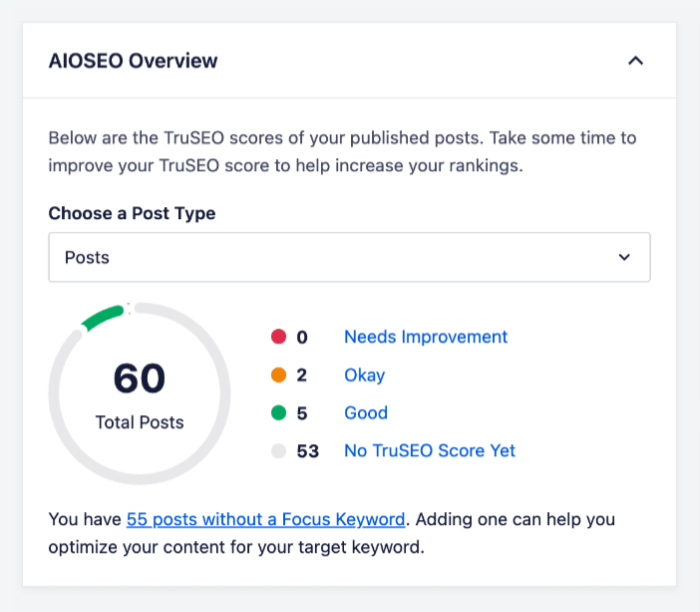
One genuine advantage over Yoast: multiple focus keywords, even on the free version. Yoast free limits you to one keyphrase, which is friction when a page targets both a product name and its common search variant. AIOSEO’s multi-keyword tracking maps more closely to how pages actually rank.
The honest limit: a TruSEO score of 100 guarantees nothing. The tool checks whether your formatting is right and your keyword sits in the expected places. It cannot evaluate whether your page answers the searcher’s question better than the ten results already ranking. Use it as a pre-publish checklist, never as a proxy for actual performance any scoring system that promises more is overpromising.
Pricing: the plans and the renewal catch
AIOSEO typically runs a 50%-off first-year promotion across all paid tiers. As of this writing:
| Plan | Promo (Year 1) | Regular | Sites | Notable additions |
|---|---|---|---|---|
| Basic | $49.50/yr | $99/yr | 1 | Core premium tools, 10,000 AI credits |
| Plus | $99.50/yr | $199/yr | 3 | Local SEO, Image SEO, 25,000 AI credits |
| Pro | $199.50/yr | $399/yr | 10 | Full feature access, priority support |
| Elite | $299.50/yr | $599/yr | 100 | Agency-scale licensing |
The detail most reviews bury: renewal pricing roughly doubles after year one. Budget against the regular price, not the promo, especially when comparing against Rank Math’s free tier.
Who needs what: a single-site content blogger can live on Basic. Local businesses need Plus for the Local SEO module. Freelancers managing client sites or serious WooCommerce stores point to Pro at ten sites, the first-year per-site cost lands around $20, which is competitive for an active freelance operation. Elite is agency territory and doesn’t make financial sense for individuals.
Does AIOSEO slow your site down?
Benchmarks consistently order the big three the same way: Rank Math lightest (roughly +0.01s load impact, +0.35 MB memory), Yoast heaviest (around +0.18s, +1.62 MB), AIOSEO in the middle. Read isolated benchmark numbers with context, though on decent hosting with a caching plugin, the real-world difference between these plugins is marginal, because hosting quality, image optimization, and caching dwarf plugin-level overhead.
Where it does matter: high-traffic sites, budget shared hosting, and sites fighting for every Core Web Vitals point. If that’s you, two mitigations keep AIOSEO lean: disable every module you don’t use (the plugin is modular by design a blog with no video content has no business running the Video SEO module) and pair it with a caching plugin like WP Rocket or W3 Total Cache. Do both and the practical gap to a lighter plugin mostly disappears.
How to set up AIOSEO correctly, start to finish
If the review so far has you leaning toward installing it, here’s the complete configuration about 30 minutes total, no technical background required.
Before you touch anything
Two pre-flight items prevent the most common self-inflicted problems. First, deactivate and delete any other SEO plugin. Running AIOSEO alongside Yoast or Rank Math produces duplicate title tags, duplicate sitemaps, and conflicting schema Google won’t know which signals to trust. One plugin, one source of truth. Second, take a backup (UpdraftPlus makes this one click). It matters doubly if you’re migrating from another SEO plugin, since existing metadata in your database is involved in the switch.
Install and run the setup wizard
For Lite: Plugins → Add New, search “All in One SEO,” and confirm the author is the official AIOSEO team before installing the directory has similarly named plugins. For paid plans: download the ZIP from your AIOSEO account, upload via Plugins → Add New → Upload Plugin, then enter your license key under General Settings after activation.
The setup wizard launches automatically on activation, and it’s one of the better onboarding flows in this plugin category most people finish in about ten minutes. The decisions that matter:
- Site category blog, online store, news site, or portfolio. This shapes your default schema.
- Entity type Person for a solo blog or personal brand, Organization for a business or brand-driven site. This feeds your site-wide schema and how Google understands who’s behind the site, so choose honestly.
- Homepage title and description write these now: primary keyword plus a clear statement of what the site offers, description under 160 characters.
- Feature selection enable only what your site type needs.
- Webmaster verification paste your Google Search Console verification code (create the property at search.google.com/search-console first if you haven’t). AIOSEO supports Bing and others here too.
Search Appearance: titles and indexing rules
After the wizard, go to All in One SEO → Search Appearance. Set your title format using AIOSEO’s smart tags page title, separator, site name is the standard pattern and pick a simple dash or pipe separator.
Then open the Content Types tab and make the indexing decisions that actually protect your site: index posts and pages; noindex tag archives and author archives, which add minimal value and create thin-content risk when Google crawls them heavily; keep date archives disabled entirely they duplicate content that already lives at your post URLs.
Sitemap configuration and submission
Under All in One SEO → Sitemaps → General Sitemap, confirm the Enable Sitemap toggle is on. Include posts and pages; exclude tags, author archives, and anything you noindexed a tight sitemap of genuinely indexable content serves Googlebot far better than an exhaustive one padded with thin archives. Click Open Sitemap to confirm the URL loads, then submit that exact URL in Search Console under Indexing → Sitemaps.
If the sitemap 404s: go to Settings → Permalinks and click Save Changes without editing anything (this rebuilds WordPress rewrite rules), flush every cache layer you run plugin, server, CDN and recheck in a private window.
Social meta: Open Graph and Twitter cards
Under Social Networks → Facebook, enable Open Graph and upload a default image of at least 1200×630 pixels the fallback whenever a page is shared without its own social image. Under Social Networks → Twitter, enable cards, pick Summary with Large Image, and add your username. One distinction worth keeping straight: social meta controls how shares look on social platforms; it does not create Google rich results. That’s schema’s job.
Schema defaults and overrides
Your wizard entity choice already handles site-level schema. For content defaults, go to Search Appearance → Content Types → Schema Markup and set Posts to Article (or BlogPosting) and Pages to Web Page. Then override per-post only where it genuinely fits: FAQ schema on FAQ pages, HowTo on tutorials, Product or Review on affiliate reviews. Free supports per-post overrides; Pro unlocks the full 18-type library. The governing rule: accurate, consistent schema beats exhaustive schema. Google ignores markup that doesn’t match the page and can flag it as misleading.
Verify everything works
Ten minutes now saves weeks of silent problems. Run All in One SEO → SEO Analysis and clear any critical issues. Then view your homepage source (Ctrl+U) and search for og:title (confirms Open Graph output) and application/ld+json (confirms schema output). If you see duplicate meta tags, another SEO plugin is still active somewhere deactivate it and flush all caches. Finally, confirm the sitemap shows as fetched without errors in Search Console.
AIOSEO vs Yoast vs Rank Math: where each actually wins
AIOSEO’s real edges: the local SEO module is deeper and more guided than Yoast’s out-of-box offering; the schema builder gives non-developers more structured-data control without code; WooCommerce support is purpose-built rather than bolted on; and the numerical TruSEO score feels more concrete to beginners than traffic-light indicators.
Where the others win: Rank Math’s free tier is simply richer than AIOSEO Lite more schema types, more advanced controls, better analytics without paying which makes it the default answer for budget-driven users. It’s also the lightest of the three on performance. Yoast offers more granular sentence-level readability feedback for long-form writers and the largest support community.
Compatibility note for page-builder users: support threads from 2025–2026 reported conflicts with Elementor and PHP notices. Most resolved once AIOSEO shipped patches, but if you run a complex plugin stack, skim the current WordPress.org support forum before installing.
For the full four-way feature matrix, our SEO plugin comparison puts AIOSEO, Yoast, Rank Math, and SEOPress side by side by site type.
Verdict: who should install AIOSEO
The honest summary: AIOSEO is a well-built, beginner-accessible plugin with a genuinely strong schema system, a practical scoring tool, and the best local-business and WooCommerce modules of the big three. The paid plans are fairly priced at promo rates, less obviously so at renewal. The free tier is functional but thinner than Rank Math’s. Performance sits in the middle a non-issue on properly hosted, cached sites.
The decision framework:
- Starting fresh and want guided setup with a clear upgrade path → AIOSEO is a solid install.
- Budget-driven, want the richest free plan → Rank Math free has more depth.
- Local business or WooCommerce store wanting everything in one plugin → AIOSEO earns its place; Plus is reasonable for what it covers.
- Already running fine on Yoast → stay. Migration cost rarely pays off without a specific feature gap.
The practical next step costs nothing: install Lite, run the ten-minute wizard using the setup section above, and write one post with TruSEO giving feedback. A week of hands-on use tells you more than any review including this one about whether the workflow fits how you actually work.