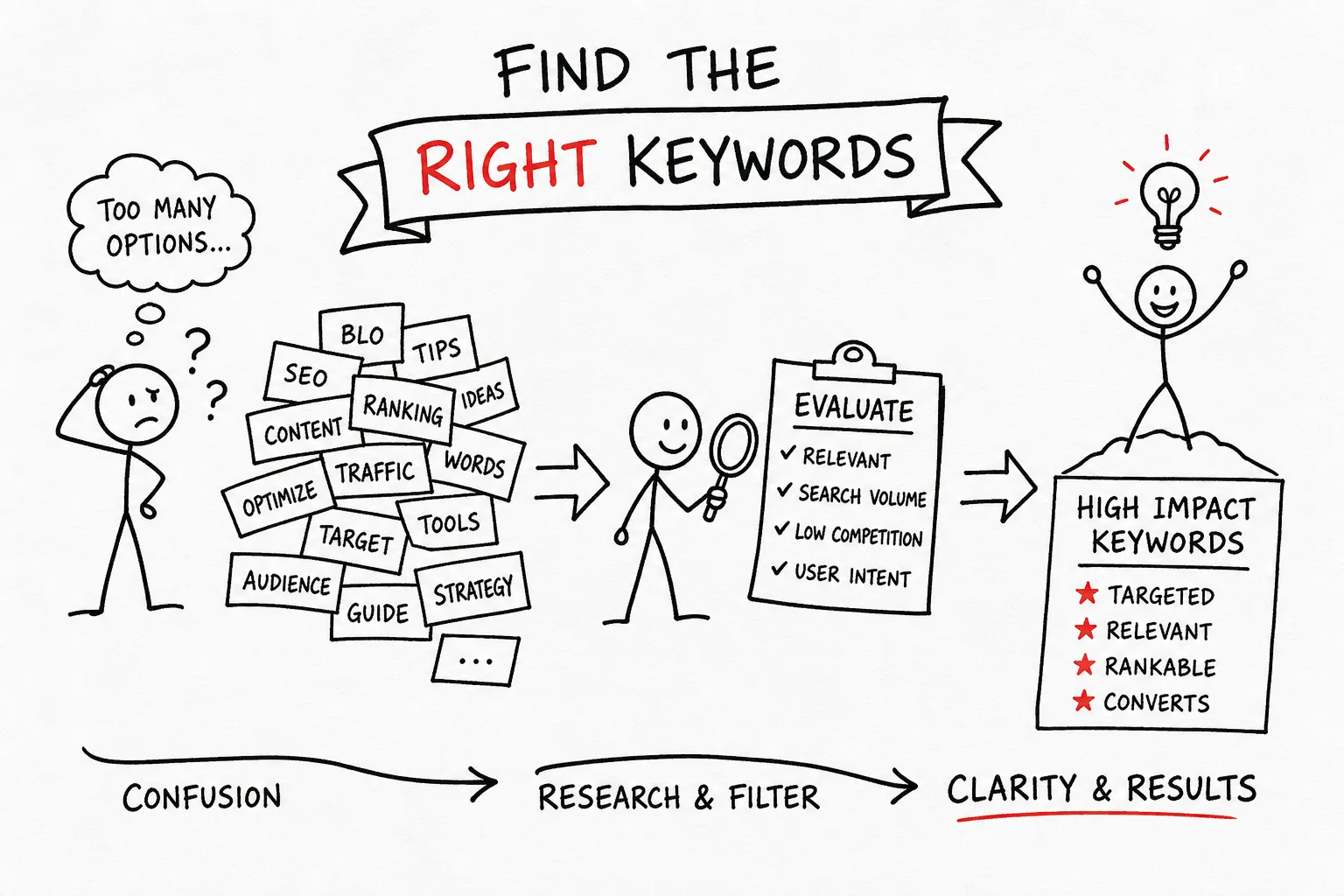
Many new bloggers pour real effort into their first several posts and still see almost no traffic. The writing is solid. The topics feel relevant. But the visitors never arrive. In most cases, the problem traces back to the same place: keyword selection happened by gut feeling rather than by a repeatable process. Choosing the wrong keywords before writing a single sentence is the fastest way to waste months of work.
In our experience at AISEO Round Table, keyword research is the first topic that comes up whenever bloggers ask how to build consistent organic traffic from scratch. If you’ve ever wondered, “How do I find the right keywords for my blog?”, this guide walks you through the complete workflow: generating seed keywords, filtering by search intent, finding long-tail opportunities you can actually win, evaluating keywords with the right metrics, choosing the right tools for your budget, and building a concrete action plan for your next five posts.
Step 1: Start with Seed Keywords, Not Random Topic Ideas
A seed keyword is a broad root topic that represents a niche area of your blog. It is not what you will rank for directly; it is the starting point that tools and research methods will expand into hundreds of real keyword opportunities. Beginners frequently skip this step and jump straight into a tool, which leads to scattered, unfocused research with no clear direction.
How to Generate Seed Keywords from Your Niche
Start without any tools. List 5 to 10 topics your blog covers, or plans to cover, then write one or two plain-English words or short phrases that describe each topic. If you run a personal finance blog, seed keywords might include “budgeting,” “credit cards,” “investing,” and “debt payoff.” These become the raw inputs that tools and Google itself will expand into specific, rankable phrases.
Using Google’s Own Suggestions to Expand Fast
Type any seed keyword into Google’s search bar and the autocomplete dropdown immediately surfaces real queries that real people type. Those predictions are based on actual search behavior, which makes them reliable candidates for long-tail blog keywords. Scroll to the bottom of the results page and the “related searches” section gives you another set of specific, intent-rich phrases. Both sources are free, require no account, and update constantly to reflect current search behavior.
Step 2: Understand What the Keyword Is Actually Asking For
Search intent is the reason behind a query. Two keywords can look similar on the surface but demand completely different content. Publishing a well-written post that is mismatched to intent is why a page can rank and still generate no clicks, no time on page, and no conversions. Matching intent is the most overlooked step in keyword research for bloggers who are just starting out.
The Three Intent Types That Matter for Bloggers
Informational intent covers queries that ask how, what, or why. These are the core of most blog content. Transactional intent covers queries where the searcher is ready to buy, sign up, or compare prices; these fit product pages, review posts, and comparison articles. Navigational intent covers brand-specific searches where the user is trying to reach a specific site or page, and these rarely belong in regular blog content at all.
Matching Intent to the Right Post Format
The simplest method is to search the keyword in Google and study the top five results. Note the dominant format: step-by-step tutorial, listicle, short explainer, roundup, or comparison. Google has already rewarded that format because it satisfies the intent better than alternatives. A “how to” query calls for a clear tutorial with numbered steps. A “best tools for” query calls for a roundup with criteria and comparisons. Match your format to what already ranks, and you start with a structural advantage.
Step 3: How to Find the Right Keywords for Your Blog, Going Long-Tail
Short-tail keywords, one or two broad words, carry high search volume and overwhelming competition. A new blog targeting “email marketing” will spend years fighting established domains with thousands of backlinks. Long-tail keywords, three or more words, are specific enough to face fewer authoritative competitors while attracting a more defined audience with clearer intent. For new blogs, targeting a keyword difficulty (KD) of 0, 29 is a reliable starting point, with the sweet spot sitting under 20 for very new sites. Anything above 40 is generally too competitive to prioritize early on.
Why Long-Tail Blog Keywords Give New Sites a Real Chance
The specificity of a long-tail phrase does two things simultaneously: it narrows the competition and it signals a precise user need. A searcher typing “email marketing for Etsy sellers” knows exactly what they want, and fewer established sites have published content targeting that exact combination. Lower competition means faster rankings, often in months rather than years, though results will vary by niche, content quality, and your backlink profile.
Three Reliable Methods to Surface Long-Tail Keyword Ideas
People Also Ask boxes inside Google search results reveal question-based phrasing around any topic. Expanding those questions often surfaces a chain of related long-tail variations. Competitor content-gap analysis shows what similar sites rank for that you don’t, exposing neglected subtopics and low-competition opportunities your blog can fill.
For blogs that already have some traffic, Google Search Console query reports surface actual long-tail searches that are already generating impressions, often revealing specific phrases you never explicitly targeted. These real-world queries are some of the most valuable keyword data you can get for free.
Step 4: Evaluate Each Keyword with the Metrics That Actually Predict Traffic
Many beginners fixate on search volume as the only metric that matters. High volume looks exciting, but it tells you nothing about how many clicks are actually available or whether your site can realistically rank for the term. A layered evaluation process gives you a much more accurate picture of whether a keyword is worth writing about.
The Metric Hierarchy for Realistic Traffic Prediction
Evaluate keywords in this order. Search volume comes first because it establishes whether enough demand exists to justify writing the post at all. SERP features come second: featured snippets, ads, and knowledge panels can reduce the organic click-through rate dramatically, meaning a keyword with 2,000 monthly searches might deliver far fewer actual clicks than the number suggests.
Keyword difficulty comes third and tells you whether a site at your authority level can realistically crack the first page. CPC is useful as a commercial-intent signal for monetization decisions, but it is not a primary traffic predictor and should be weighted last.
KD and Volume Thresholds for New vs. Established Blogs
New blogs should target KD 0 to 29, with the ideal range sitting under 20 whenever possible. The goal is pairing that low difficulty with enough search volume to make the post worthwhile. Established blogs with growing authority can push into KD 30 to 50 and compete more effectively for moderate-volume terms. The mistake to avoid at every stage is chasing high-volume, high-KD keywords that look impressive but will take years to rank without significant domain authority behind them.
Step 5: Pick Your Tools, Starting Free and Upgrading When Ready
Most beginner bloggers don’t need a $200 per month platform on day one. Starting with free tools and upgrading only when your workflow outgrows their limitations is the practical approach. The limitations are real, but they won’t hold you back when you’re still building your first ten to twenty posts.
Free Tools That Cover the Basics
Google Keyword Planner provides raw volume data tied directly to Google’s own ad data, making it the best free starting point for validating demand. Google Search Console is the strongest free option for sites that already have some traffic, surfacing real queries, impressions, and click data from your own pages. Ubersuggest’s free tier is useful for quick brainstorming and content ideas, though it limits searches to three per day. Together, these three tools cover the core needs of idea generation, demand validation, and existing-traffic mining without spending anything.
When a Paid Tool Like KWFinder Is Worth It
The free-only setup starts to slow you down at a specific point: when you need accurate keyword difficulty scores, competitor analysis, or content-gap features all in one workflow. Without reliable KD data, evaluating opportunity becomes guesswork. KWFinder and the broader Mangools suite are affordable paid options built specifically for bloggers and small site owners, not for enterprise teams with large agency budgets. It’s worth noting that all-in-one platforms like Semrush and Ahrefs offer more comprehensive data sets, though at a higher price point that’s harder to justify when you’re starting out. In our experience at AISEO Round Table, KWFinder is a strong budget-friendly starting point for bloggers who want accurate KD data without the enterprise price tag. We’ve published in-depth reviews of both KWFinder and Mangools for readers who want to compare features and pricing before committing. For an independent roundup of top options, see this guide to the best keyword research tool.
Step 6: Build Your Keyword Action Plan for the Next 5 Posts
Once your tools are in place, the research still needs a destination. The goal of this entire workflow is a short, prioritized keyword list you can act on immediately, not a spreadsheet you revisit once and abandon.
How to Map Target Keywords to Upcoming Blog Posts
Take five seed keywords from Step 1 and run each through the research and evaluation process above. For each seed, select one long-tail variation with KD under 30 and clear informational intent, then assign it to a working post title. The one-keyword-per-post rule matters because it keeps each article focused on a single search need rather than trying to rank for multiple unrelated phrases at once. A focused post with clear intent alignment outperforms a sprawling post that targets three different queries and satisfies none of them well.
Making Keyword Research a Repeatable Weekly Habit
We recommend setting aside 30 to 45 minutes per week for keyword research: review new ideas from PAA boxes and autocomplete, check Search Console for emerging queries your existing pages are attracting, and add viable terms to a running list. The objective is not endless research but a steady queue of pre-vetted, low-competition target keywords ready to write. When you sit down to plan next week’s post, the keyword should already be chosen, validated, and waiting.
Start Finding the Right Keywords for Your Blog Today
How do I find the right keywords for my blog? It doesn’t require an expensive agency or years of experience. It requires a clear, repeatable process: start with seed keywords, filter by intent, prioritize long-tail phrases with manageable difficulty scores, validate with the right metrics, and use tools that match your current stage and budget.
In our experience at AISEO Round Table, this workflow scales naturally as your site grows and your authority builds. The thresholds shift and the tools expand, but the underlying process stays the same, and that consistency is what turns keyword research from a one-time scramble into a reliable content habit.
Pick one seed keyword from a topic you know well, run it through the steps above, and find the first long-tail opportunity for your next post. If you’re ready to move beyond free tools, check out the Best Keyword Research Strategies to Boost Your SEO, AISEO Round Table for an honest breakdown of features, pricing, and who each tool is best for. You can also read Keyword Research: What It Is and Why It Matters, AISEO Round Table for a primer on why this process is worth the time.