If you want to know how to analyze SERP results before writing a single word, you’re already ahead of most beginners. Many new bloggers pick a keyword, write the article, publish it, and then wonder why they’re stuck on page four. The missing step happens before any writing starts. Checking the search results page for your target keyword is the diagnostic move that tells you exactly what Google is already rewarding, what format it prefers, and whether you can realistically compete. Skip this step and you’re writing blind.
At AISEO Round Table, we walk beginners through this exact check before touching any content brief, because the SERP tells you everything you need to know before you start. This guide covers how to analyze SERP results across five areas: reading organic listings for intent signals, interpreting SERP features, scanning competitor signals, using a SERP checker to pull it all together, and turning your findings into a clear action plan.
Why reading the SERP first saves you from wasted effort
SERP analysis isn’t guesswork. It’s reading what Google has already decided users want for a given query. Bloggers and small site owners often waste weeks writing 2,000-word guides for keywords dominated by YouTube videos or e-commerce category pages, where a text-based article is unlikely to rank competitively. One look at the results page would have shown them the problem before they typed a single sentence.
How to analyze SERP results: what each read actually reveals
Every SERP read surfaces three core signals. It shows you the content format Google is rewarding, step-by-step guides, listicles, product pages, video, or something else entirely. It reveals the searcher’s underlying goal, which is what SEOs call search intent. And it gives you a real-world read on competitive difficulty, independent of any tool score. Together, these signals tell you whether a keyword is worth pursuing and what it would take to win it.
The difference between ranking difficulty and keyword difficulty
Keyword difficulty scores from tools are a useful starting point, but they’re not the final answer. A keyword can show a low difficulty score while the actual SERP is stacked with well-established, high-authority pages that a new site has no realistic shot at displacing. The SERP itself is the real source of truth. Use the tool score to find candidates, then inspect the results page manually before committing to any keyword.
How to analyze SERP results: reading organic listings and identifying search intent
Open an incognito or private browser window, search your target keyword, and look at the top five to ten organic results with real attention. The titles, URLs, and meta descriptions tell a clear story about what type of content Google is surfacing. This is where Search Intent: The Key to Ranking Content begins, and it costs nothing but a few minutes.
Spotting intent patterns in titles and URLs
Informational SERPs are packed with titles like “how to,” “what is,” “guide,” and “explained.” Commercial SERPs surface pages with “best,” “vs.,” and “review” in their titles. Transactional SERPs show product and category pages, sometimes alongside local business listings. Within seconds of scanning the titles on page one, you should be able to match the results to an intent category. If you can’t, that’s a signal the query has mixed intent, which is its own important finding.
Reading content format signals from the SERP layout
Beyond intent type, the SERP shows what format Google prefers for that specific query. Check whether the top results are long-form blog posts, listicles, short FAQ-style answers, video embeds, or image galleries. If eight of the top ten results are step-by-step guides, writing a comparison table is almost certainly the wrong move. Your content format needs to match what the SERP is already rewarding, not what you personally prefer to write.
Decoding SERP features and what each one signals
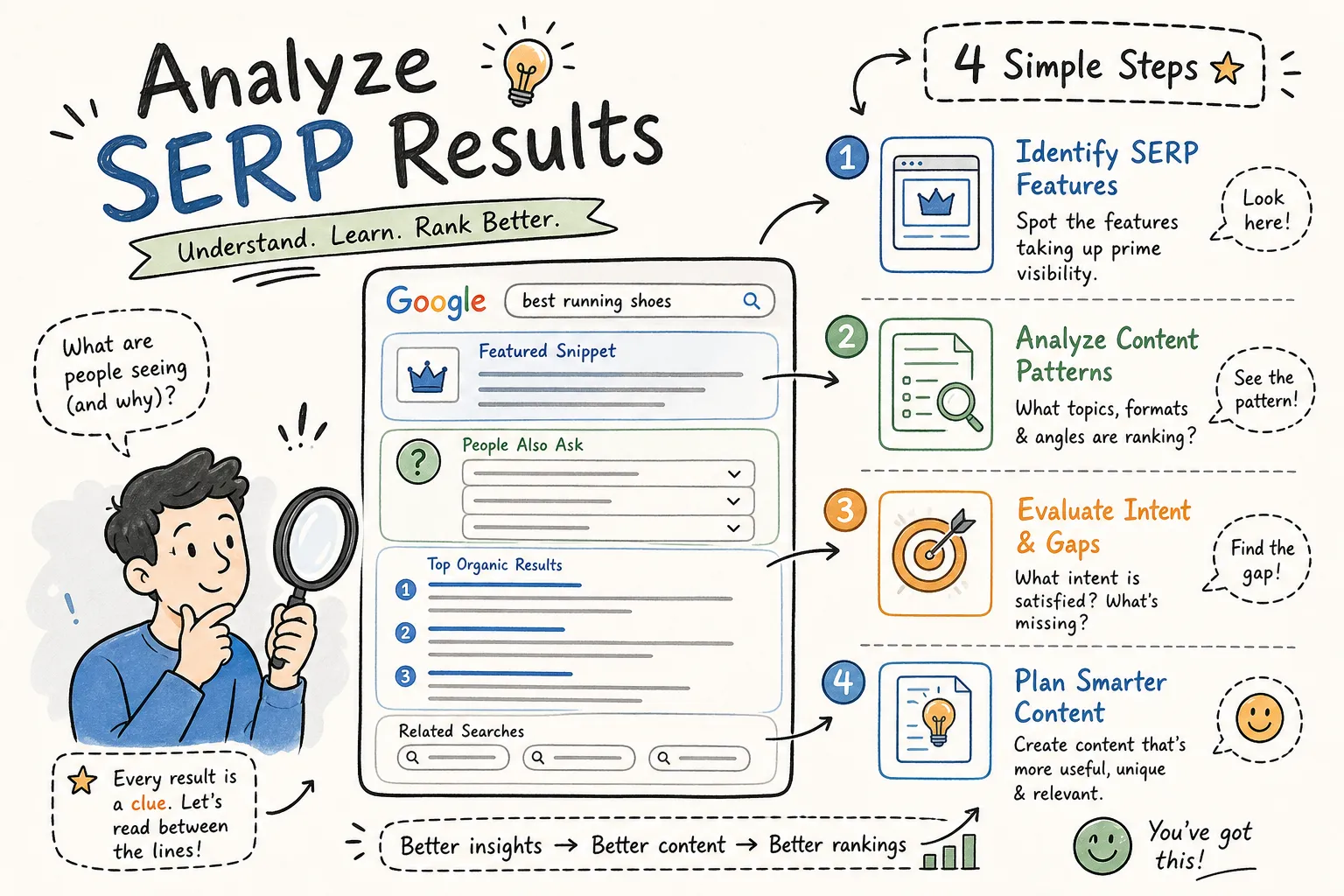
SERP features are the non-standard elements that appear alongside or above the organic blue links. They’re not just visual clutter, each one tells you something specific about the query’s intent and the opportunity available to you. Recognizing them quickly is one of the skills that separates experienced SEOs from beginners who just look at the rankings. Reliable Google SERP checker tools and manual SERP feature detection both play a role here. For a quick reference on feature types, see the Google SERP features guide.
Featured snippets: what they mean and when they’re winnable
A featured snippet at the top of the results means Google is actively looking for a direct, concise answer to the query. Pages that answer a question clearly and structure the answer well, whether as a short paragraph, a numbered list, or a table, have a real shot at earning the box. Industry estimates suggest featured snippets appear in roughly 6, 15% of searches, and a key insight is that they can come from pages that aren’t ranking #1 in the standard organic results. That makes them a potential quick-win opportunity for smaller sites with solid content, though the net effect on click-through rates varies by query type.
People Also Ask boxes and what related questions reveal
People Also Ask (PAA) boxes appear in a significant share of queries, one industry estimate puts the figure at around 58%, though prevalence varies by dataset and query type. For SERP analysis purposes, PAA is a goldmine. Each question in the box is a subtopic users actually care about, and a dense PAA block signals that the query is exploratory and multi-layered.
These questions tell you which supporting sections your content needs, which angles your competitors may be missing, and which subtopics Google considers closely related to the main query. If you’re analyzing SERP results and see a long PAA section, treat it as a free content outline.
Other features worth checking: local pack, video, and image results
A local pack signals strong local intent, which significantly changes the competitive landscape for content creators without a physical location. Video results mean Google sees visual demonstration as the preferred format for that query. Image packs signal that visual content is part of what users expect to find. Each of these features is a clue about what you need to create or, just as importantly, whether you can realistically compete at all given your site’s content format.
Analyzing competitor signals to gauge ranking difficulty
The goal of this step isn’t to copy what’s ranking. It’s to assess how strong the competition is and where potential gaps exist. Look at who is ranking, not just what is ranking. The identity and characteristics of the pages in the top ten tell you far more than their individual content topics do. For a deeper walkthrough on competitor-focused tactics, see Master Competitor Keyword Analysis for SEO Success, AISEO Round Table.
What to look for in the top organic results
Run a quick scan across four dimensions: domain type (major media brands, niche blogs, or e-commerce sites), content depth (comprehensive guides or thin, short pages), freshness (look for publication or last-updated dates in the meta descriptions), and whether smaller or newer sites appear in the top ten. When the results page is full of Forbes, HubSpot, and Healthline, you’re looking at a tough SERP. When niche blogs and newer domains are ranking in positions two through eight, the door is open.
Reading authority signals without leaving the results page
You can pick up meaningful signals directly from the SERP without any tool. Breadcrumb paths showing a page buried deep in a large site’s structure suggest strong domain authority behind it. Review stars and sitelinks indicate established brand recognition. Recognizable domain names appearing across multiple unrelated niches are a red flag for difficulty. These visual signals give you a preliminary difficulty read before you open any tool, and they make the tool data more meaningful when you do pull it up.
Using a SERP checker to pull it all together
Manual scanning is essential, but a dedicated SERP checker surfaces data you simply can’t see with the naked eye: domain authority scores, backlink counts, and estimated traffic for each ranking URL. This is where the full picture comes together, and it’s where you move from impression to actual decision-making. If you want a practical step-by-step workflow, check this guide on how to do SERP analysis.
What Mangools’ SERPChecker shows you in one view
Mangools is a lightweight, budget-friendly option commonly used by bloggers and small teams who want solid SERP data without an enterprise tool budget. In a single view, SERPChecker displays domain authority, page authority, number of backlinks, and estimated traffic for every page ranking in the top results. That combination gives a beginner a complete competitive picture without needing to run multiple tools or interpret raw data from different platforms. Mangools is priced for individual creators and small teams, making it realistic for anyone managing their own site without agency support.
Key metrics to check before committing to a keyword
Use a simple filter when reviewing the data: if most top-ranking pages carry high domain authority scores and thousands of backlinks, you’re looking at a hard SERP. If several pages in the top ten have low authority scores and thin backlink profiles, there’s room to compete. According to Mangools’ own documentation, their keyword difficulty scale treats 0 to 29 as the generally winnable range for newer sites. Pair these tool metrics with the manual signals you gathered from your SERP scan for the most reliable read on whether to pursue the keyword or move on.
Turning your SERP audit into a concrete action plan
After completing the analysis, you have two decisions to make: create a new page that matches what the SERP rewards, or optimize an existing page that’s already indexed but underperforming. Both are valid moves, and the SERP data tells you which one applies.
When to create a new page vs. optimize what you already have
If the SERP intent matches an existing page’s topic but the page isn’t ranking, an on-page update and stronger content structure is the first move. If the SERP is dominated by a format your existing page doesn’t match, say, a results page full of step-by-step guides when your page is a general overview, creating a new piece that aligns with the SERP format is the smarter call. Trying to force an existing page into a format it wasn’t built for rarely works as well as starting fresh with the right structure from the beginning.
Your go-to SERP analysis checklist
Before any content decision, run through these six checks:
- What is the dominant intent type (informational, commercial, transactional)?
- What content format is Google rewarding on this SERP?
- Which SERP features are present, and are any of them winnable for your site?
- How strong are the top competitors based on domain authority and backlink counts?
- Is there a content gap you can fill, such as PAA questions no one is answering fully or missing subtopics in the top results?
- Does your site realistically fit this SERP right now, or is this a long-term play that needs more authority first?
Once you’ve done this a handful of times, the whole checklist runs in under ten minutes, though your first pass will naturally take longer depending on the keyword and how competitive the SERP is. That investment of time can save you weeks of effort pointed in the wrong direction.
Start with one keyword and run the process today
Analyzing SERP results is a skill that gets faster with practice. Your first full run-through might take thirty minutes or more, depending on keyword complexity. After several dozen runs, you’ll scan a results page in a fraction of that time and know exactly what you’re dealing with before you’ve written a headline. The pattern recognition builds quickly.
Start with one keyword you’re already targeting. Run through every step in this guide: read the organic listings, identify the intent, note the SERP features, scan the competitors, and pull up the SERPChecker data. Then compare what you find to what you assumed about that keyword before you started. The gap between assumption and reality is usually where ranking problems live.
Once you’ve practiced how to analyze SERP results with that first keyword, come back to AISEO Round Table for the next step in the workflow. We have guides on keyword research, on-page optimization, and the broader Mangools toolset, including our Technical SEO Checklist for Beginners, AISEO Round Table.