
The top best SEO plugins for WordPress matter because 75% of searchers don’t click past the first page of results . Your site risks disappearing in search rankings and losing potential visitors to competitors if you lack the right WordPress SEO tools. We tested over 20 WordPress SEO plugins hands-on to identify which ones deliver results . Rank Math excels in advanced features. Yoast stands out for ease of use . This piece breaks down the best SEO plugin options and helps you make the right choice for your site.
AIOSEO – Best All-Around WordPress SEO Plugin
Image Source: AIOSEO
AIOSEO has served WordPress users since 2007, making it the original WordPress SEO plugin with over 3 million active installations [1]. Awesome Motive acquired the plugin in 2020 and gave the interface a complete overhaul while keeping its core strengths intact.
What Makes It Stand Out
The setup wizard walks you through configurations in under 10 minutes [1]. AIOSEO’s guided process asks clear questions and explains options in plain language. The plugin handles 19 different redirect types automatically [1] and generates schema markup. It creates complete XML sitemaps without requiring coding knowledge.
Key Features
TruSEO Analysis provides an up-to-the-minute content score with applicable recommendations to improve on-page optimization. The system assesses keyword placement and readability metrics.
Schema Generator creates rich snippets for star ratings and recipes, making search results more engaging. Link Assistant scans content and suggests internal linking opportunities, eliminating manual work. Local SEO Module optimizes business information for Google Maps and local search results, managing multiple locations from one dashboard [2]. Redirection Manager supports 301, 302, 307 redirects and 16 other redirect types [1], preventing 404 errors when you restructure your site.
Pros and Cons
Pros:
- WooCommerce SEO included in free version
- Complete site audit checklist
- Nonprofit discount program available
- 14-day money-back guarantee
Cons:
- Higher memory usage compared to lightweight alternatives [3]
- Premium features locked behind higher pricing tiers
- Site audits run slowly on large websites [1]
Pricing
| Plan | Sites | Annual Cost | Key Features |
| Simple | 1 | $49.60 | Simple SEO tools, WooCommerce integration |
| Plus | 3 | $99.60 | Local SEO, News sitemaps |
| Pro | 10 | $199.60 | Video SEO, Link Assistant |
| Elite | 100 | $299.60 | Agency tools, priority support |
Prices reflect current 50% promotional discount [4].
Yoast SEO – Best for Beginners
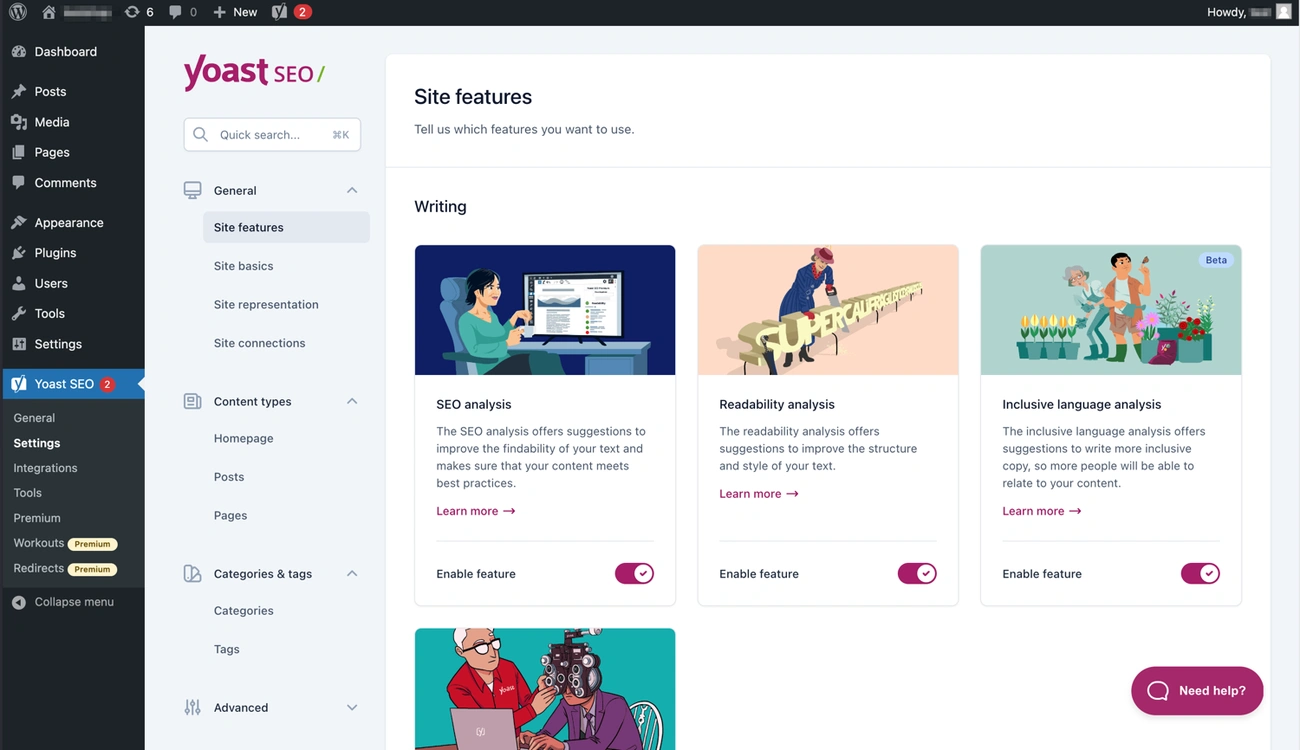
Image Source: WordPress
With over 13 million active installations and 850 million downloads, Yoast SEO dominates as the world’s most trusted WordPress SEO plugin [5]. The plugin’s signature green, orange, and red traffic light system gives instant feedback on content optimization and makes it available for users with zero technical background [5].
What Makes It Stand Out
The configuration wizard eliminates guesswork. It walks beginners through settings in simple steps [5]. You’ll enter site representation details and connect social media profiles. You’ll choose data tracking priorities without encountering technical jargon [5]. Yoast automatically generates schema markup under Settings > Schema. This has breadcrumbs for navigation and graph creation that connects content with brand identity [5].
Key Features
Three-tier analysis system reviews every piece of content. The SEO analysis checks keyphrase placement in introductions and subheadings. It monitors keyphrase density, confirms meta description length (120-156 characters), and reviews image alt attributes [5]. The readability analysis gets into sentence length and paragraph structure. It also checks transition word usage to ensure content involves readers and reduces bounce rates [5]. The inclusive language analysis flags non-inclusive words or phrases [5].
AI-powered tools in Premium and AI+ packages accelerate optimization. Yoast AI Generate produces multiple optimized title and meta description options in seconds [5]. AI Optimize delivers precise, practical edits during writing [5]. AI Summarize creates bullet-point summaries for content tops [5].
Google Search Console integration provides data about keyword performance. You get page appearance frequency in search results and technical errors [5].
Pros and Cons
Pros:
- Free version has XML sitemaps and optimization
- Configuration wizard simplifies setup
- 24/7 support with Premium subscription
Cons:
- Traffic light system can encourage chasing scores over quality content
- Ads for premium features appear in free version dashboard
- Premium costs recur annually
Pricing
Free version covers fundamental SEO needs. Premium costs $99 per year for one site and adds multi-keyword optimization (up to 5 keywords), internal linking suggestions, redirect management, and AI-powered features [6].
Rank Math – Best Free SEO Plugin
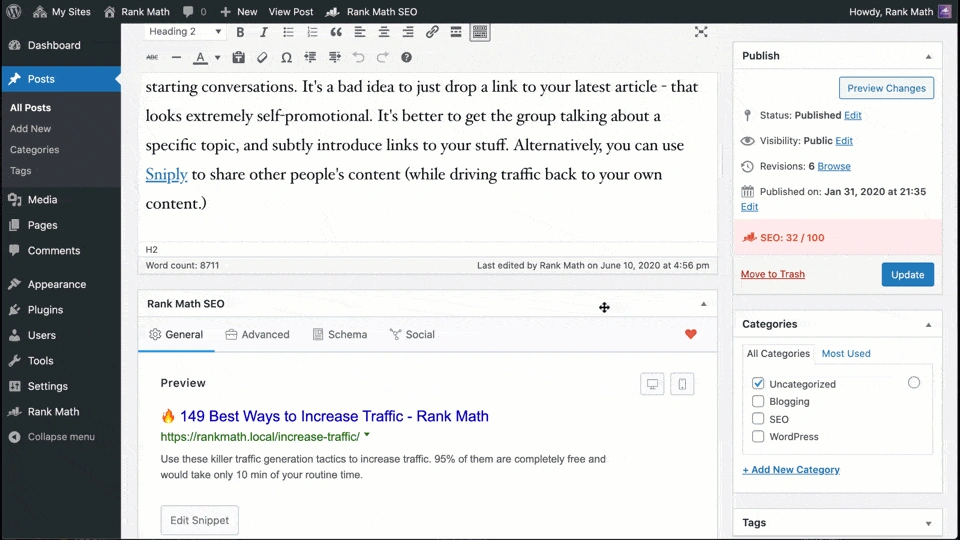
Image Source: WordPress
Rank Math gained over 4 million active installations [7] by offering premium-level features without charging a subscription fee. The free version delivers capabilities you’d find in paid WordPress SEO plugins. Competitors lock advanced tools behind paywalls.
What Makes It Stand Out
The setup wizard configures the plugin in under 5 minutes [7] and detects optimal settings based on your site’s existing configuration. One-click migration from Yoast, AIOSEO, SEOPress, and Redirection plugin works well [1] and preserves all existing optimizations. The modular architecture lets you enable only needed features [4] and reduces resource consumption. So you can activate WooCommerce integration for online stores while disabling features irrelevant to your site.
Key Features
Multi-keyword optimization allows targeting up to 5 focus keywords per page in the free version [4]. Most competitors limit you to one. 100-point SEO analysis assesses content across over 40 ranking factors [8] and provides specific recommendations for improvement. Schema markup support has 20+ types [7], from FAQ and HowTo to product reviews and local business schemas. Role Manager controls which WordPress user roles can access specific Rank Math features [1]. 404 monitor and redirect manager supports 301, 302, and 307 redirects with regex-based rules and bulk management [1]. Google Search Console integration displays keyword performance and click-through rates in WordPress [7].
Pros and Cons
Pros:
- Free features rival premium plugins from competitors [8]
- Fast performance without slowing site speed [7]
- Updates with new capabilities happen often [8]
- Supports unlimited personal websites on Pro plan [9]
Cons:
- Feature overload can overwhelm beginners [8]
- Content AI requires separate subscription starting at $83.88/year [4]
- Analytics integration increases server load by up to 15% [1]
- Grading system sometimes conflicts with actual ranking performance [1]
Pricing
| Plan | Monthly Cost | Sites Supported | Keywords Tracked |
| Free | $0 | Unlimited | N/A |
| Pro | $8.99 | Unlimited personal | 500 |
| Business | $27.99 | 100 client sites | 10,000 |
| Agency | $64.99 | 500 client sites | 50,000 |
All paid plans renew at listed monthly rates plus taxes [9].
SEOPress – Best for Privacy-Focused Users
Image Source: WordPress.org
SEOPress stands apart among WordPress SEO plugins by prioritizing data privacy without compromising functionality. The plugin has earned the trust of 350,000+ websites since 2017 [3] and operates on a strict no-tracking policy. This makes it the preferred choice to handle sensitive user data or operate under GDPR regulations.
What Makes It Stand Out
Zero data collection separates SEOPress from competitors that track usage patterns. The plugin sends no anonymous telemetry to external servers [10] and stores no information outside your WordPress installation [10]. You’ll find no advertisements in either free or premium versions [11]. White label functionality removes all SEOPress branding from your dashboard [10]. This proves useful for agencies that want to present clean interfaces to clients. The cookie bar feature helps you manage user consent and comply with GDPR requirements [3]. You won’t need to purchase separate consent management plugins.
Key Features
Matomo Analytics integration provides GDPR-friendly tracking as an alternative to Google Analytics. It supports both cloud-hosted and self-hosted configurations [3]. DoNotTrack detection respects user privacy preferences [3]. Unlimited keyword analysis reviews content against multiple target keywords at once, even in the free version [3]. AI-powered metadata generation creates optimized titles and descriptions [3]. Schema markup wizard guides you through structured data implementation [12]. Redirect management appears in the free version [12], whereas competitors lock this behind premium tiers.
Pros and Cons
Pros:
- Clean interface with no promotional banners [12]
- White label included in base Pro package [12]
- All Pro features bundled without add-on fees [12]
Cons:
- Documentation lacks depth compared to competitors [3]
- Smaller community for troubleshooting support
Pricing
| Plan | Annual Cost | Sites | Key Features |
| Free | $0 | Unlimited | Basic SEO, analytics, white label with code |
| Pro (1 site) | $49 | 1 | AI tools, redirects, schema |
| Pro (5 sites) | $59 | 5 | Same as 1 site |
| Pro (Unlimited) | $149 | Unlimited | Same as 1 site |
All plans include a 14-day money-back guarantee [11].
The SEO Framework – Best Lightweight Plugin
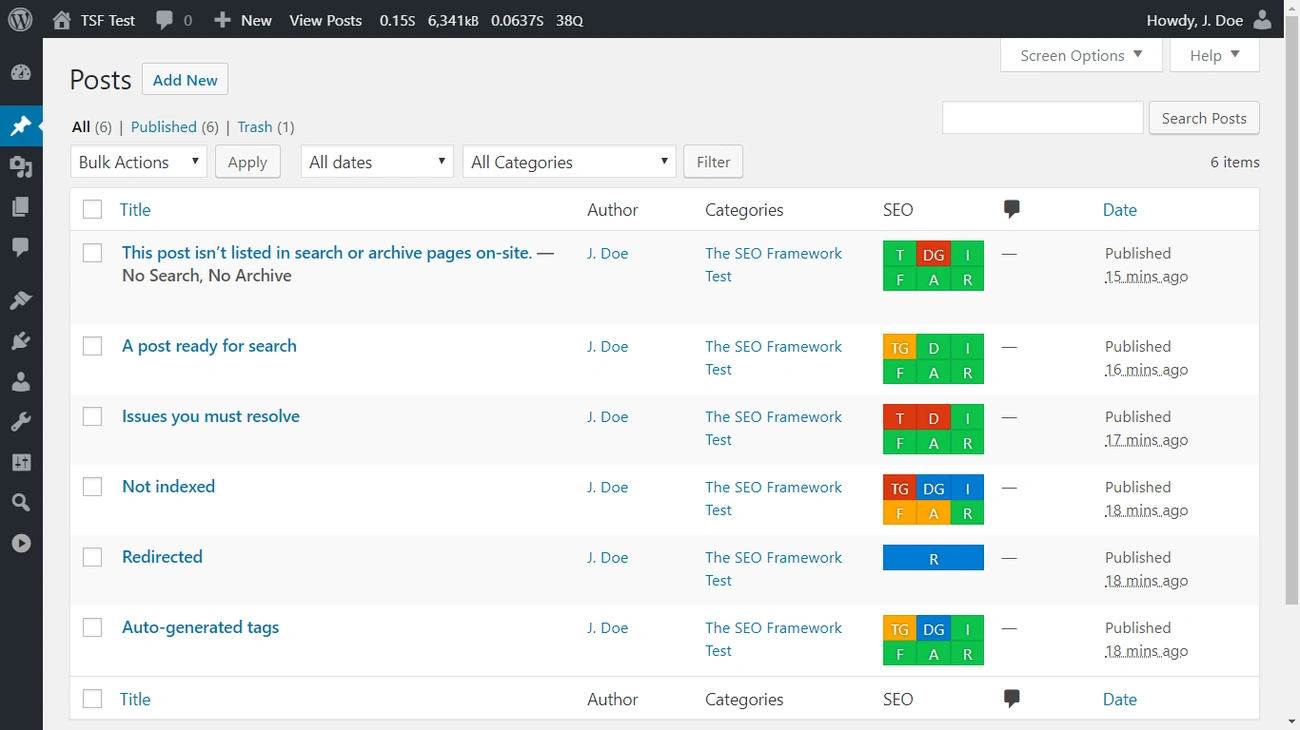
Image Source: WordPress
The SEO Framework flips the typical WordPress SEO plugin approach by handling optimization on autopilot from the moment you activate it [2]. Dutch developer Sybre Waaijer launched it in 2015 [5]. The plugin loads 5.6 times faster than Yoast and up to 16 times faster than All in One SEO [5]. It has 200,000+ active installations [5] and an average rating of 4.9 stars [5]. This makes it the highest-rated SEO plugin on the official directory [5].
What Makes It Stand Out
You keep full control over your privacy. The plugin doesn’t track your data or phone home to external servers [2]. Everything stays on your server [2]. The hands-off approach configures proven SEO settings right after installation [2]. This means you skip hours of manual setup. All settings appear on a single page [5]. Competitors scatter options in multiple submenus. The color-coded SEO boxes give instant feedback on your post overview screen: green indicates optimal optimization and yellow warns of possible issues. Red flags critical problems [2].
Key Features
Intelligent meta generation creates titles and descriptions based on your content structure [2]. Schema.org structured data markup adds proper formatting for articles and breadcrumbs [2]. Canonical URLs prevent duplicate content penalties on autopilot [2]. XML sitemaps generate and notify search engines when you publish new content [2]. The Extension Manager unlocks additional capabilities through 6 premium and 5 free extensions [5].
Pros and Cons
Pros:
- Zero advertisements or premium upsells [5]
- White label functionality included [2]
- 30-day refund policy [6]
Cons:
- Two-site minimum for paid plans [6]
- Smaller community than competitors that have been around longer [2]
Pricing
| Plan | Annual Cost | Sites | API Requests |
| Free | $0 | Unlimited | N/A |
| Pro | $84 | 2 | 5,000/month |
| Business | $204 | 20 | 50,000/month |
| Agency | $324 | 200 | 500,000/month |
All premium extensions unlock with paid subscriptions [5].
Schema Pro – Best for Rich Snippets

Image Source: Schema Pro
Rich snippets displaying star ratings, pricing, and product details in search results capture 58% more clicks than standard listings. Schema Pro addresses this chance by automating structured data implementation across WordPress sites without requiring coding knowledge.
What Makes It Stand Out
Brainstorm Force built Schema Pro. This is the same team behind Astra theme [13]. Schema Pro uses JSON-LD format, which Google recommends [13]. The automation system lets you configure a schema type once and map it to specific fields across your whole site [14]. This eliminates the need to edit thousands of pages one by one. Custom field support works naturally with Advanced Custom Fields and Pods [15]. This makes it valuable for sites using custom post types.
Key Features
13 schema types cover Review, Local Business, Article, Service, Product, Course, Recipe, Person, Job Postings, Software Application, Book, Event, and Video Object [13]. Global mapping applies markup to thousands of pages at once by connecting schema fields to existing data [14]. Live schema testing integrates with Google’s structured data testing tool for validation [14]. Display rules control which pages receive specific schema types through targeting options [15].
Pros and Cons
Pros:
- Beginner-friendly interface requires no coding skills [13]
- 100% ACF compatibility [15]
- 14-day money-back guarantee [13]
Cons:
Pricing
| Plan | Annual | Lifetime | Domains |
| Schema Pro | $79 [14] | $249 [13] | Unlimited |
| Growth Bundle | $249 [14] | $699 [13] | Unlimited |
Growth Bundle has SkillJet Academy access [13].
WP Rocket – Best for Speed Optimization
Image Source: wp-rocket.me
Site speed affects search rankings because Google’s Core Web Vitals initiative treats loading time as a ranking factor [16]. WP Rocket approaches performance optimization differently than traditional WordPress SEO plugins by delivering results the moment you activate it.
What Makes It Stand Out
WP Rocket applies 80% of web performance best practices upon activation [16]. Setup takes 3 minutes flat [16], whereas competitors require hours of manual configuration. The plugin makes page caching, mobile caching, browser caching, GZIP compression, cache preloading and critical image optimization possible without touching a single setting [16]. Rocket Insights, the built-in performance hub, monitors key pages and gives clear recommendations on which features to enable next [16].
Key Features
Page and browser caching creates static HTML files that load instantly and stores frequently-used files locally to reduce server requests [17]. CSS and JavaScript optimization has minification, combination, deferred loading and delayed execution until user interaction, improving Largest Contentful Paint and Interaction to Next Paint metrics [17]. LazyLoad defers off-screen images, videos and iframes, saving bandwidth [17]. Database optimization removes post revisions and spam comments through scheduled automatic cleanups [17]. CDN integration works with existing providers or RocketCDN at $8.99/month [18].
Pros and Cons
Pros:
- GTMetrix scores improved from 79 to 86 after activation [7]
- Compatible with WP Engine and major managed hosting [8]
- 14-day money-back guarantee [1]
Cons:
- No free version available [1]
- Advanced features like delayed JavaScript require testing [19]
- Resource-intensive on shared hosting [1]
Pricing
| Plan | Annual Cost | Sites |
| Single | $59 | 1 |
| Plus | $119 | 3 |
| Infinite | $299 | Unlimited |
All plans have similar features and Rocket Insights [7].
MonsterInsights – Best for Analytics Integration
Image Source: WordPress.org
Visitor behavior understanding separates successful websites from those that guess their way through content strategy. MonsterInsights bridges Google Analytics with WordPress and transforms complex data into practical insights. You won’t need to become skilled at analytics platforms. Over 3 million active installations [20] prove its value. The plugin serves everyone from bloggers to enterprise operations like Microsoft, Bloomberg, and FedEx [4].
What Makes It Stand Out
Setup completes in under 5 minutes through a connection wizard that requires zero coding knowledge [20]. The plugin configures event tracking, eCommerce monitoring, and link attribution on its own [20]. You’ll see visitor data, traffic sources, and page performance inside your WordPress dashboard [4]. This eliminates constant switching between platforms.
Key Features
The eCommerce tracking addon integrates with WooCommerce, Easy Digital Downloads, MemberPress, and LifterLMS [4]. You can monitor transactions, revenue, conversion rates, and customer behavior from one dashboard [4]. Form tracking measures conversion rates and abandonment across WordPress forms [21]. Affiliate link tracking reveals which content drives clicks and revenue [21]. Link Attribution identifies specific link clicks without coding [4].
Pros and Cons
Pros: User-friendly dashboard simplifies complex analytics data [4]. Google Analytics 4 compatibility with dual tracking support [21]. GDPR compliance features included [21].
Cons: Annual subscriptions range from $99.50 to $239.70 [4]. Site performance may decrease from additional scripts [4]. The free Lite version offers limited reporting capabilities [21].
Pricing
| Plan | Annual Cost | Sites | Key Tracking |
| Plus | $99.50 | 1 | eCommerce, forms, dimensions |
| Pro | $159.60 | 5 | Everything in Plus |
| Agency | $239.70 | 25 | White label, priority support |
All plans include a 14-day money-back guarantee [20].
Broken Link Checker – Best for Link Management
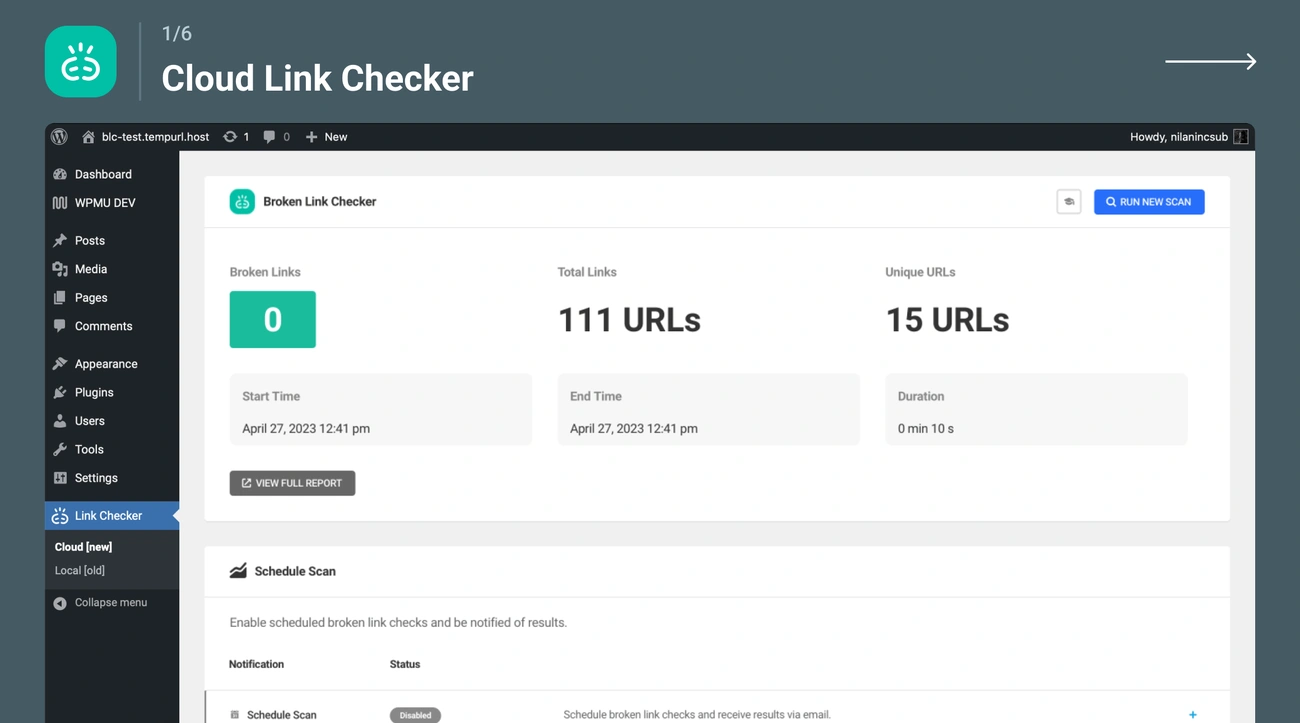
Image Source: WordPress.org
Broken links damage user experience and waste crawler resources that could index functional pages. Broken Link Checker addresses this automatically with over 17 million downloads and 50,000+ broken links detected daily across WordPress sites [9].
What Makes It Stand Out
Cloud-based scanning delivers results 20x faster than other WordPress SEO tools [9]. The plugin gets into posts, pages and custom fields without manual checks [9]. You can choose between cloud-based or local engine options based on your server capacity [9]. Email alerts notify you when links break [9], and multisite support manages multiple installations from one dashboard [9].
Key Features
Dashboard editing lets you fix, unlink or ignore broken links without opening individual posts [9]. Advanced search filtering targets specific URLs or error types [9]. The system catches broken images and redirects [9]. Automatic rescans run weekly to prevent prolonged 404 errors [22].
Pros and Cons
Pros:
- Detailed scanning has custom post types [9]
- Bulk actions accelerate cleanup [9]
- Integration with Wayback Machine for missing pages [9]
Cons:
Pricing
Free version available. Cloud-based premium features included in AIOSEO plans starting at $49.60 a year [24].
Redirection – Best for URL Management
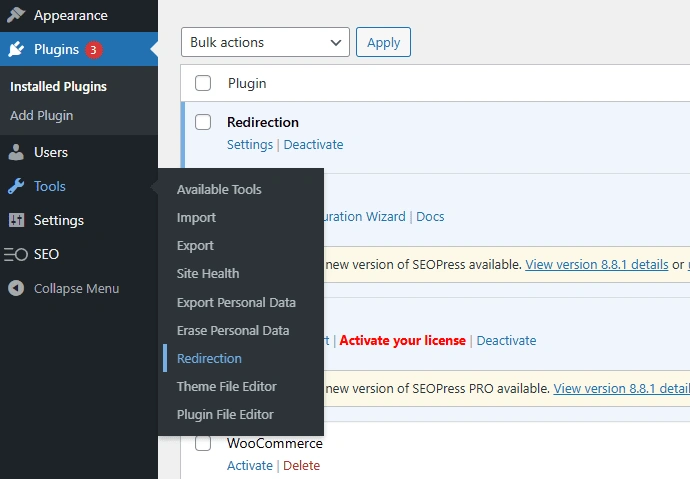
Image Source: SEOPress
Pages that move or get deleted create 404 errors that increase bounce rates and harm rankings [25]. Redirection has managed this challenge for over 10 years as the most popular redirect manager for WordPress with over 500,000 active installations [3].
What Makes It Stand Out
The plugin is free with no premium version or upsells [3]. It handles everything from simple 301 redirects to complex conditional rules based on login status, browser type, IP address, cookies and HTTP headers [3][25]. Redirect creation happens on its own at the time you change post permalinks [10] and removes the need for manual tracking. Import and export functionality supports Apache .htaccess, Nginx rewrite rules and CSV or JSON formats [3].
Key Features
404 error monitoring logs every broken link with visitor details, browser information and referrer data [3][26]. Errors group by frequency to show where attention matters most [3]. Regular expression support creates redirect patterns that match multiple URLs at once [3][10]. Hit tracking counts redirect usage to identify valuable links [3]. HTTP header management adds custom headers for security or redirect control [3].
Pros and Cons
Pros:
- Detailed logs accelerate broken link fixes [26]
- Compatible with PHP 7.4 to 8.4 [3]
- Fine-grained user permissions for client sites [3]
Cons:
Pricing
Free forever with all features included [3][28].
Squirrly SEO – Best AI-Powered SEO Tool
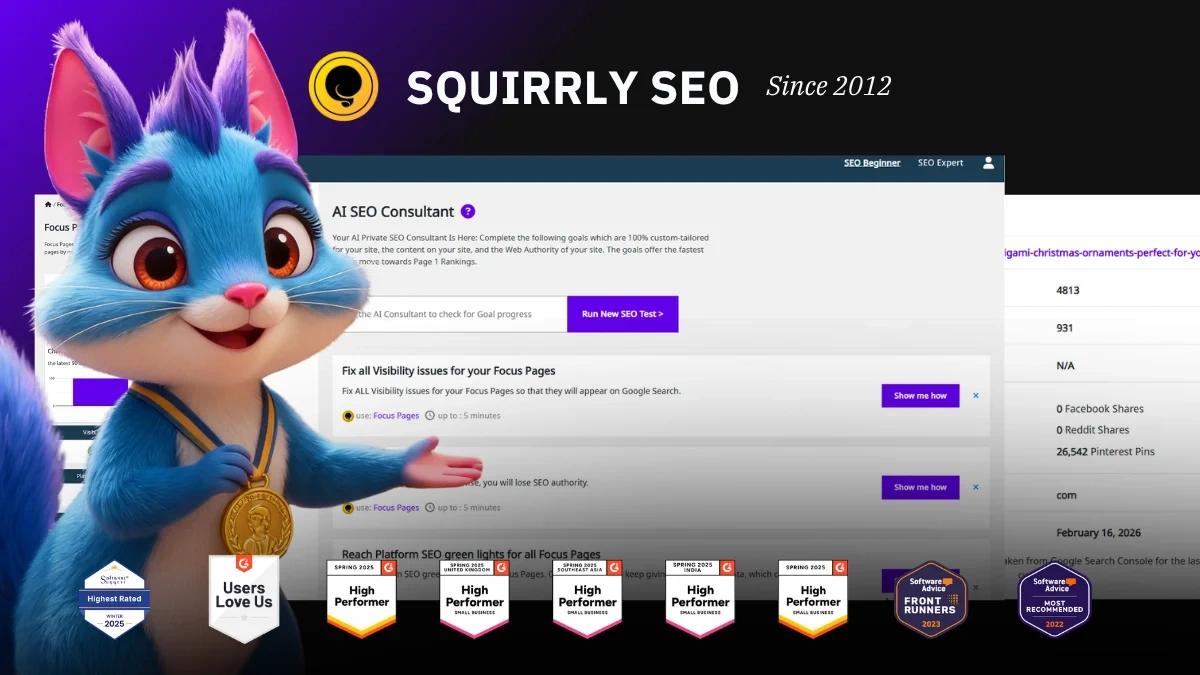
Image Source: Squirrly
Squirrly SEO combines plugin functionality with AI-driven guidance. It serves over 600,000 websites that achieved higher rankings through machine learning analysis [12]. The plugin uses three proprietary AI technologies from AISQ: Ranking Vision AI for dynamic goals, Keyword Research AI for chance discovery, and ASK AI for intelligent recommendations [29].
What Makes It Stand Out
Step-by-step instructions replace raw data dumps. The plugin tells you exactly what actions to take rather than showing confusing metrics [12]. A 14-day bootcamp guides you through ranking a page using your own site [29]. Competitors assume you already understand SEO strategy. Focus Pages reveal why specific pages aren’t ranking and provide page-specific tasks to fix problems [12].
Key Features
SEO Live Assistant delivers live optimization feedback as you write in Gutenberg, Elementor, or Divi [29]. Built-in keyword research analyzes search volume, competition data, and ranking odds without external tools [12]. AI-powered goals create dynamic SEO plans tailored to your site’s needs [29]. Copyright-free images integrate with proper alt tags based on target keywords [30].
Pros and Cons
Pros:
- Covers whole SEO lifecycle from research to rank tracking [31]
- Suitable for non-SEO experts with guided approach [29]
- Includes integration with Google Search Console [31]
Cons:
Pricing
| Plan | Monthly Cost | Sites | Focus Pages |
| Free | $0 | 1 | 1 |
| Pro | $29.99 | 7 | Limited |
| Business | $71.99 | 7 | Advanced features [11] |
Slim SEO – Best Set-and-Forget Solution
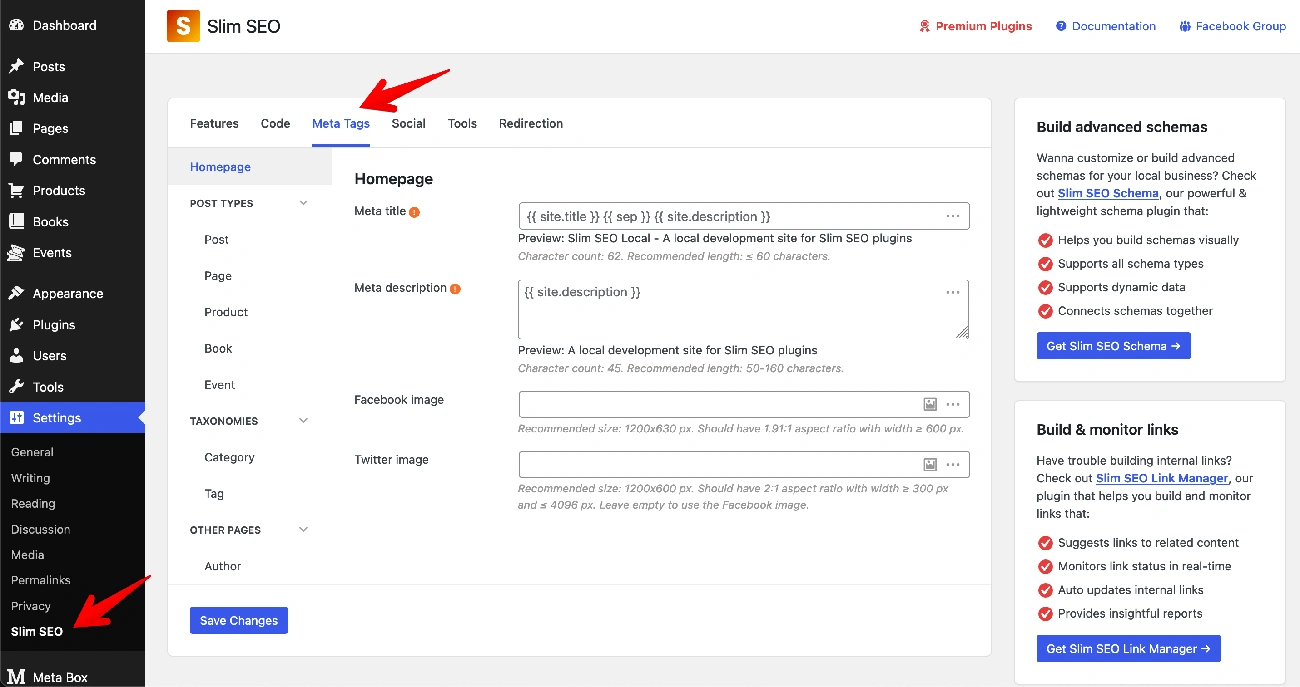
Image Source: Slim SEO
Slim SEO eliminates configuration by automating every WordPress SEO task from the moment you activate it. The Meta Box team built it with 600,000+ active installations and over 10 years of WordPress development experience [34]. The plugin delivers essential optimization without overwhelming dashboards or endless settings.
What Makes It Stand Out
The ReactJS framework creates a native WordPress interface that feels integrated rather than bolted-on [34]. So you won’t encounter weird color schemes or strange controls. Database queries stay optimized even on large sites [34]. The plugin works well where every query counts [35]. Migration tools import SEO data like meta titles and descriptions from other WordPress SEO plugins naturally [36].
Key Features
Automatic meta tag generation creates titles, descriptions and Open Graph tags without manual input [36]. XML sitemaps generate at yourdomain.com/sitemap.xml [35] and include image and Google News sitemaps. Schema markup appears as unified JSON-LD graphs [34]. The Pro version adds a visual schema builder with 30+ types, immediate link health monitoring, broken link repair, contextual link suggestions and Google Search Console integration [34].
Pros and Cons
Pros: Zero configuration required, lightweight code maintains fast performance, compatible with WPML and major page builders [36].
Cons: Fewer tutorials than prominent competitors [35], Pro features require paid upgrade.
Pricing
| Plan | Cost (30% off) | Sites | Annual Renewal |
| Personal | $41.30 | 1 | $59 |
| Freelancer | $83.30 | 10 | $119 |
| Agency | $125.30 | Unlimited | $179 |
All plans include one-year updates, support and 14-day refund policy [34]. Discount valid until June 10, 2026.
W3 Total Cache – Best Free Caching Plugin
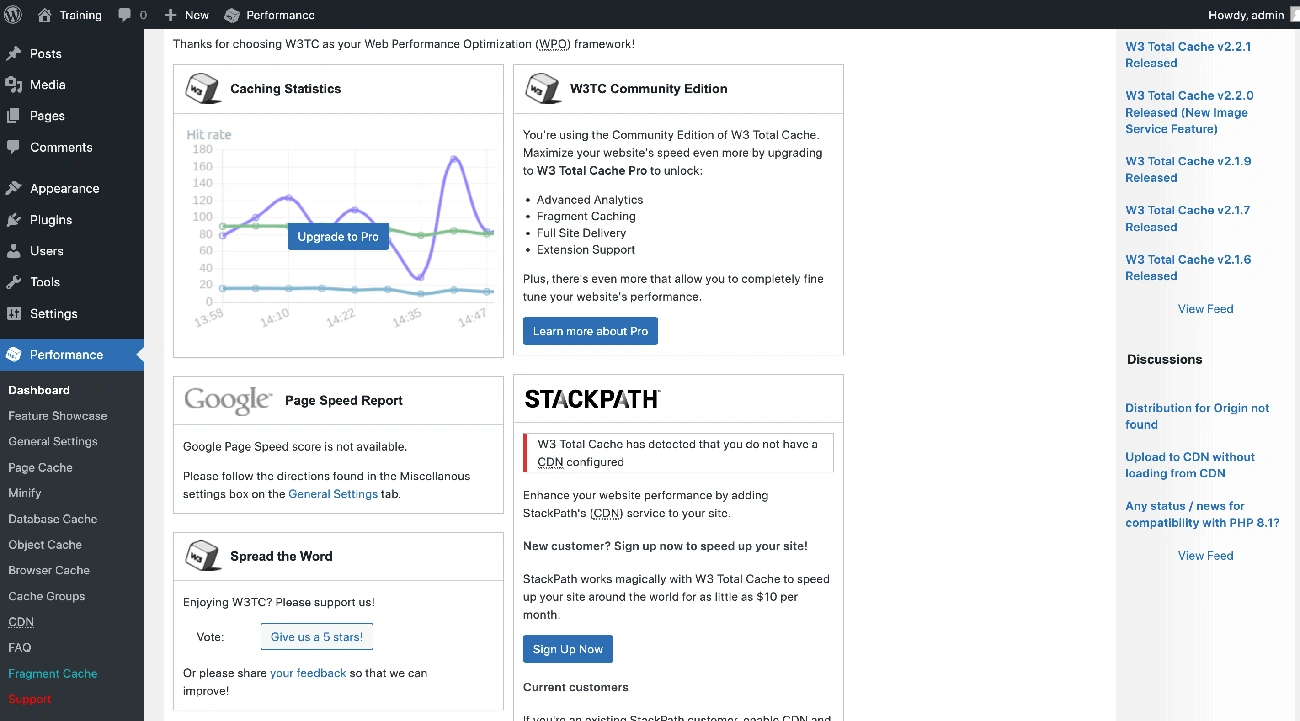
Image Source: Learn WordPress – WordPress.org
W3 Total Cache has operated as WordPress’s most complete free caching solution since before 2010, accumulating over 1 million active installations [37]. This plugin delivers granular control over every performance aspect through multiple caching layers, unlike set-and-forget alternatives.
What Makes It Stand Out
The free version has features competitors lock behind premium tiers. You get page caching, object caching, database caching, browser caching, CDN integration, fragment caching, and minification without paying [38]. Fragment caching proves valuable for eCommerce and membership sites with dynamic content [37]. The plugin supports Redis, Memcached, and disk-based caching methods [39].
Key Features
WebP conversion transforms JPG/PNG images to Google’s modern format and reduces file sizes while maintaining quality [37]. Lazy loading defers images, iframes, and JavaScript until visible [37]. Database caching stores frequently accessed data in memory and enhances front-end and back-end performance [37]. Asset minification compresses CSS and JavaScript files [37].
Pros and Cons
Pros:
Cons:
- 16 pages of settings may intimidate beginners [38]
- Clunky, outdated interface [37]
- Potential theme/plugin incompatibility [37]
Pricing
| Plan | Annual Cost | Sites |
| Free | $0 | Unlimited |
| Pro | $99 | 1 |
| Pro | $350 | 5 |
| Pro | $500 | 10 |
Pro adds REST API caching, fragment caching, unlimited WebP conversion, and script optimization [37].
LowFruits – Best for Keyword Research
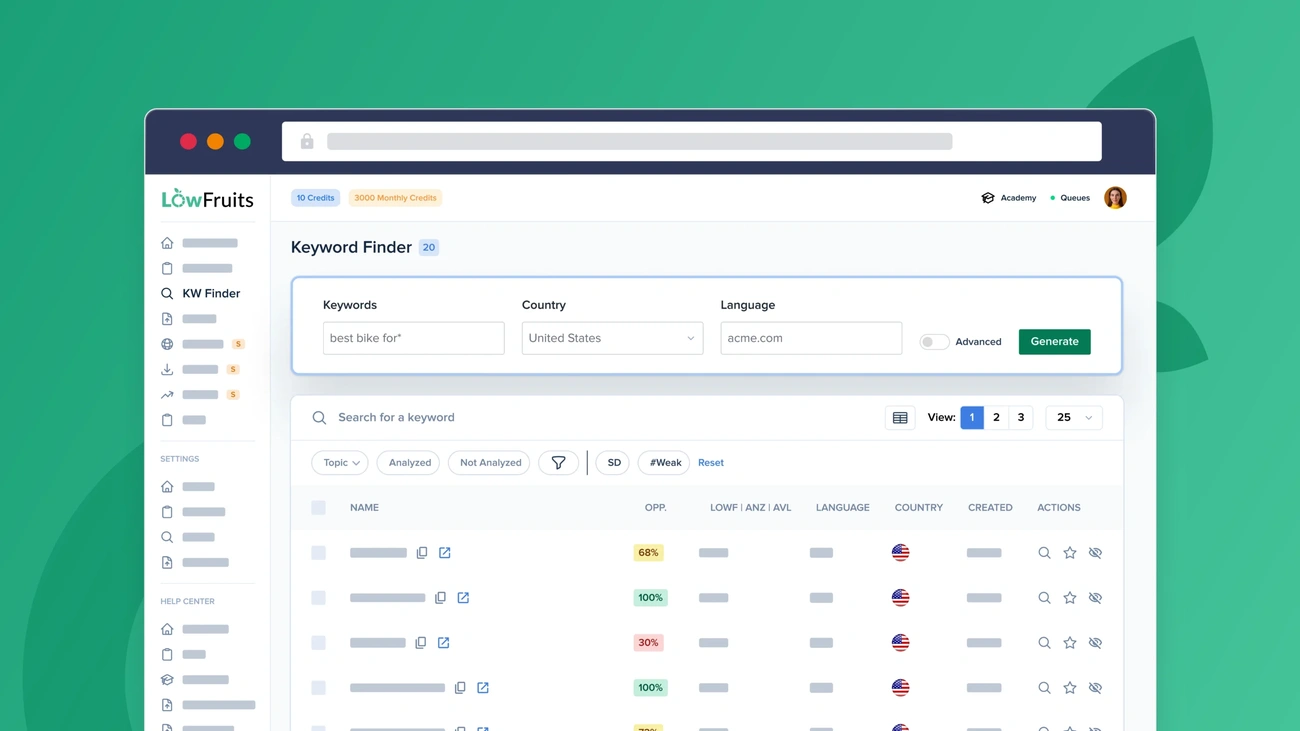
Image Source: LowFruits
Finding keywords you can rank for remains one of WordPress SEO’s biggest problems. LowFruits solves this by analyzing search engine result pages to identify weak spots where low-authority sites already rank, founded in late 2020 by Paul Pilavachi [40].
What Makes It Stand Out
The visual SERP approach replaces abstract difficulty scores with practical insights [41]. You see exactly which forums, user-generated content, and low-authority domains occupy top positions [6]. Wildcard searches using asterisks uncover keyword combinations competitors miss in standard WordPress SEO tools [6]. So the platform fetches long-tail ideas straight from Google Autocomplete [42].
Key Features
Keyword Finder uses the Alphabet Soup Method to generate thousands of suggestions [2]. Weak Spots Analysis color-codes domains by authority, with green that indicates sites under DA 20 [5]. Domain Explorer uncovers thousands of weak domains ranking in your niche [43]. Extract Feature pulls ranking keywords from competitor websites [43]. Rank Tracker monitors position changes [43].
Pros and Cons
Pros: Beginners find the interface simple, targets realistic opportunities for new sites, and offers flexible pay-as-you-go pricing [43].
Cons: Heavy analysis depletes credits quickly [44], and focuses only on keyword research without backlink or technical audits [44].
Pricing
| Plan | Monthly | Annual | Credits/Month |
| Standard | $29.90 | $249 | 3,000 [42] |
| Premium | $79.90 | $749 | 10,000 [42] |
| PAYG | – | – | $25 for 2,000 [42] |
Pay-as-you-go packages expire credits after one year [42].
SEOBoost – Best for Content Optimization
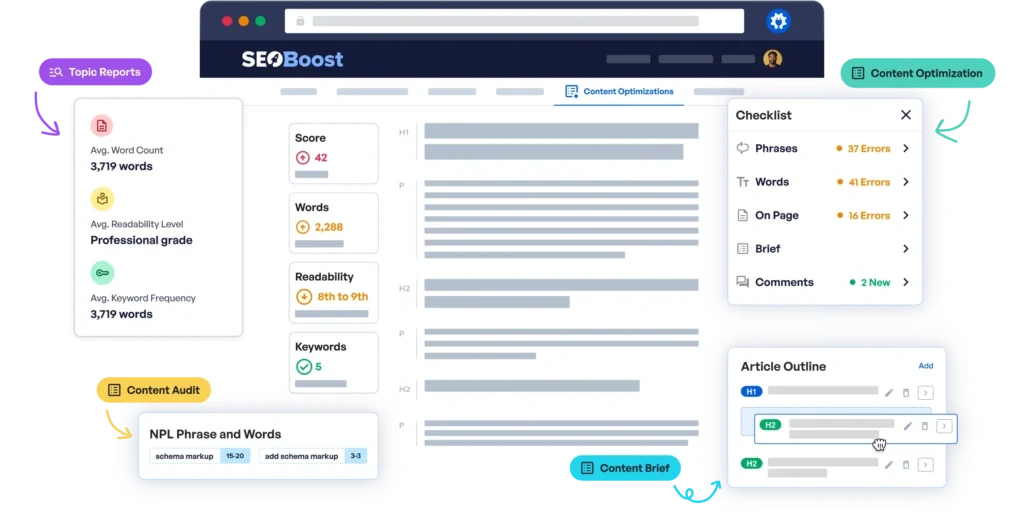
Image Source: seoboost.com
The AIOSEO team launched SEOBoost in 2024 as their dedicated content optimization platform [15]. This pedigree matters because AIOSEO powers over 3 million WordPress sites. SEOBoost applies that same expertise to the whole content lifecycle.
What Makes It Stand Out
Topical Reports analyze the top 30 ranking competitors using AI and natural language processing [15]. You’ll see competitor breakdowns across 24 content metrics that include word counts, readability levels and keyword frequency [15]. The Content Audit Tool assesses existing pages against 25 ranking metrics and identifies what needs improvement [45]. Immediate optimization scores change as you write. You can fine-tune content on the spot [15].
Key Features
Content Campaigns organize ongoing SEO efforts by grouping related projects with team assignments and deadlines [15]. Content Projects manage individual pieces from research through publication [15]. Media Library centralizes visual assets with unlimited stock photo access [45]. Content Briefs generate AI-powered outlines based on SERP analysis [45]. WordPress integration makes optimization possible inside your dashboard [15].
Pros and Cons
Pros: Detailed toolkit covers research through optimization [15]. AI insights backed by real SERP data [15]. Smooth WordPress workflow [15].
Cons: Credits limited on lower tiers. Learning curve for all features.
Pricing
| Plan | Monthly Cost | Workspaces | Reports/Briefs/Audits |
| Essential | $22.50 | 3 | 10 each [15] |
| Team | $47.50 | 10 | 30 each [15] |
| Agency | $80.83 | 30 | 100 each [46] |
All plans include a 14-day money-back guarantee [15].
Comparison Table
Comparison Table: The 15 Best SEO Plugins for WordPress
| Plugin Name | Best For | Active Installations | Free Version | Starting Price | Key Strengths | Main Limitations |
| AIOSEO | All-Around WordPress SEO | 3 million+ | Yes | $49.60/year (1 site) | TruSEO Analysis, 19 redirect types, detailed site audit, WooCommerce SEO in free version | Higher memory usage, premium features locked behind tiers, slow audits on large sites |
| Yoast SEO | Beginners | 13 million+ | Yes | $99/year (1 site) | Traffic light system, configuration wizard, 24/7 support with Premium, inclusive language analysis | Traffic light system can prioritize scores over quality, ads in free version |
| Rank Math | Free SEO Plugin | 4 million+ | Yes | $8.99/month (Pro) | 5 focus keywords in free version, 100-point SEO analysis, 20+ schema types, fast performance | Feature overload for beginners, Content AI requires separate subscription ($83.88/year) |
| SEOPress | Privacy-Focused Users | 350,000+ | Yes | $49/year (1 site) | Zero data collection, no ads, white label included, GDPR-friendly Matomo integration | Smaller community, documentation lacks depth |
| The SEO Framework | Lightweight Plugin | 200,000+ | Yes | $84/year (2 sites minimum) | 5.6x faster than Yoast, no tracking, automated optimization, single-page settings | Two-site minimum for paid plans, smaller community |
| Schema Pro | Rich Snippets | Not mentioned | No | $79/year | 13 schema types, JSON-LD format, global mapping, 100% ACF compatibility | No free version or trial, learning curve for advanced features |
| WP Rocket | Speed Optimization | Not mentioned | No | $59/year (1 site) | 80% of best practices auto-applied, 3-minute setup, Rocket Insights performance hub | No free version, resource-intensive on shared hosting |
| MonsterInsights | Analytics Integration | 3 million+ | Yes (Lite) | $99.50/year (1 site) | 5-minute setup, immediate data in WordPress dashboard, eCommerce tracking, GA4 compatibility | Limited reporting in free version, additional scripts may slow site |
| Broken Link Checker | Link Management | Not mentioned (17M downloads) | Yes | Free (Premium in AIOSEO $49.60/year) | Cloud-based scanning 20x faster, 50,000+ links detected daily, multisite support | Local engine consumes resources, scans slow on large sites at first |
| Redirection | URL Management | 500,000+ | Yes | Free | Free, automated redirect creation, 404 monitoring, regex support | Interface overwhelming for beginners, bulk redirects may slow sites |
| Squirrly SEO | AI-Powered SEO Tool | 600,000+ | Yes | $29.99/month (Pro) | Three proprietary AI technologies, 14-day bootcamp, built-in keyword research, step-by-step guidance | Interface can overwhelm beginners, adds noticeable page weight |
| Slim SEO | Set-and-Forget Solution | 600,000+ (Meta Box team) | Yes | $41.30/year (1 site, 30% off) | Zero configuration, automated meta generation, ReactJS framework, lightweight | Fewer tutorials than competitors |
| W3 Total Cache | Free Caching Plugin | 1 million+ | Yes | Free (Pro $99/year) | Multiple caching layers, WebP conversion, Redis/Memcached support, fragment caching | 16 pages of settings, outdated interface, potential compatibility issues |
| LowFruits | Keyword Research | Not mentioned | No | $29.90/month | Visual SERP analysis, wildcard searches, Weak Spots Analysis, Alphabet Soup Method | Credits deplete quickly, no backlink or technical audits |
| SEOBoost | Content Optimization | Not mentioned (launched 2024) | No | $22.50/month | Topical Reports with 24 metrics, Content Audit Tool, AI-powered briefs, WordPress integration | Credits limited on lower tiers, learning curve |
Conclusion
These points show that choosing the right WordPress SEO plugin depends on your specific requirements. Rank Math delivers great value to free users, while Yoast simplifies optimization for beginners. Privacy-conscious sites benefit from SEOPress, and sites that need speed require WP Rocket.
You don’t need to install multiple plugins right away. Start with one core SEO plugin that matches your main need, then add specialized tools like Schema Pro or Broken Link Checker as your strategy develops.
The plugins I’ve tested here solve different problems well. Pick the one that matches your current goals and test it on your site. Monitor the results over the next 30 days.
FAQs
Q1. Which WordPress SEO plugin is the lightest and doesn’t slow down my site? The SEO Framework is considered the lightest option, loading 5.6 times faster than Yoast and up to 16 times faster than All in One SEO. It automatically configures optimization settings without overwhelming your dashboard with upsells or advertisements, making it ideal for users who want effective SEO without the bloat.
Q2. Do I need a paid SEO plugin, or is a free version sufficient? For most users, free versions provide all essential SEO functionality including meta tags, XML sitemaps, and basic optimization. Rank Math offers exceptional value in its free version with features like multi-keyword optimization and schema markup that competitors lock behind paywalls. Consider paid versions only if you need advanced features like AI-powered content optimization, extensive analytics integration, or agency-level tools.
Q3. What’s the main difference between Yoast SEO and Rank Math? Yoast SEO focuses on simplicity with its traffic light system and guided setup, making it ideal for beginners who want straightforward recommendations. Rank Math offers more advanced features in its free version, including support for up to 5 focus keywords and over 40 ranking factors, but can overwhelm users new to SEO with its extensive options.
Q4. Can SEO plugins guarantee higher search engine rankings? No SEO plugin can guarantee specific rankings. These tools simplify technical optimization tasks like meta tag management, schema markup, and sitemap generation, but rankings ultimately depend on content quality, backlinks, user experience, and numerous other factors beyond plugin control.
Q5. How do I choose between multiple SEO plugins for my specific needs? Start by identifying your primary requirement: beginners should consider Yoast or The SEO Framework for simplicity, privacy-focused users should explore SEOPress, speed-conscious sites benefit from WP Rocket, and those needing advanced free features should try Rank Math. Install one core plugin that matches your main goal, test it for 30 days, and add specialized tools only as your strategy develops.
References
[1] – https://wpastra.com/review/wp-rocket-review/
[2] – https://lowfruits.io/blog/best-long-tail-keyword-research-tools/
[3] – https://wordpress.org/plugins/redirection/
[4] – https://www.elegantthemes.com/blog/wordpress/monsterinsights-review
[5] – https://lowfruits.io/blog/automated-keyword-research/
[6] – https://lowfruits.io/
[7] – https://blogvault.net/wp-rocket-plugin-review/
[8] – https://wpengine.com/blog/supercharge-site-speed-wp-rocket/
[9] – https://wordpress.org/plugins/broken-link-checker/
[10] – https://blogvault.net/wordpress-redirect-plugin/
[11] – https://plugin.squirrly.co/wordpress-seo-pricing/
[12] – https://appsumo.com/products/squirrly-seo/?srsltid=AfmBOoqd16Ur7d1pzSEg0Yqkg4o-QH1QHVqcyGFgwIbhgyG_pgNEqC3Q
[13] – https://wplift.com/schema-pro-review/
[14] – https://aioseo.com/best-wordpress-schema-generator-plugins/
[15] – https://www.isitwp.com/seoboost-review/
[16] – https://wp-rocket.me/
[17] – https://wp-rocket.me/features/
[18] – https://crocoblock.com/blog/wp-rocket-wordpress-caching-plugin-review/
[19] – https://fatlabwebsupport.com/blog/website-optimization/wp-rocket-review/
[20] – https://www.monsterinsights.com/
[21] – https://www.pushengage.com/monsterinsights-review/
[22] – https://wpmudev.com/broken-link-checker/
[23] – https://wpmarmite.com/en/compare/best-wordpress-seo-plugins/broken-link-checker/
[24] – https://aioseo.com/pricing-broken-link-checker/
[25] – https://www.dreamhost.com/blog/301-redirects-wordpress/
[26] – https://www.content-technologist.com/redirection-review/
[27] – https://reviewx.io/blog/wordpress-redirect-plugins-pros-cons/
[28] – https://www.wpbeginner.com/plugins/best-wordpress-redirect-plugins-compared/
[29] – https://wordpress.org/plugins/squirrly-seo/
[30] – https://www.squirrly.co/seo/
[31] – https://zapier.com/blog/best-wordpress-seo-plugins/
[32] – https://nickschaeferhoff.com/squirrly-seo-review/
[33] – https://comparebestai.com/tools/squirrly-seo-ai
[34] – https://wpslimseo.com/products/slim-seo-pro/
[35] – https://ultida.com/slim-seo-review/
[36] – https://wpml.org/plugin/slim-seo/
[37] – https://www.elegantthemes.com/blog/wordpress/w3-total-cache-review
[38] – https://fatlabwebsupport.com/blog/website-optimization/w3-total-cache-review/
[39] – https://wordpress.org/plugins/w3-total-cache/
[40] – https://blog.topicranker.com/lowfruits-alternatives/
[41] – https://startupik.com/lowfruits-find-easy-seo-opportunities-before-competitors-do/
[42] – https://lowfruits.io/pricing/
[43] – https://www.isitwp.com/lowfruits-review/
[44] – https://weekendgrowth.com/low-fruits-keyword-research-tutorial/
[45] – https://aioseo.com/introducing-seoboost/
[46] – https://seoboost.com/pricing/