You write a blog post on a topic you know inside and out, hit publish, and then watch the traffic counter sit at zero for weeks. Sound familiar? That’s one of the most common frustrations we hear from new bloggers at AISEO Round Table, and the cause is almost always the same: the post was written the way the author thinks, not the way the audience searches. If you’re just getting started, this guide to keyword research for beginners walks you through exactly how to close that gap.
Keyword research maps your subject-matter knowledge to the actual language your target readers type into Google. Get that translation right, and your content has a real chance of being found. Skip it, and you’re writing for yourself.
Below you’ll find a five-step process that takes you from raw topic ideas to a prioritized content plan you can start executing this week.
What Keyword Research for Beginners Actually Does for a Small Site
Think of keyword research as audience research with data attached. It answers one core question: what exact words does my target reader type when they search for what I cover? That question sounds simple, but the answer shapes every content decision you make, from topic selection to page structure.
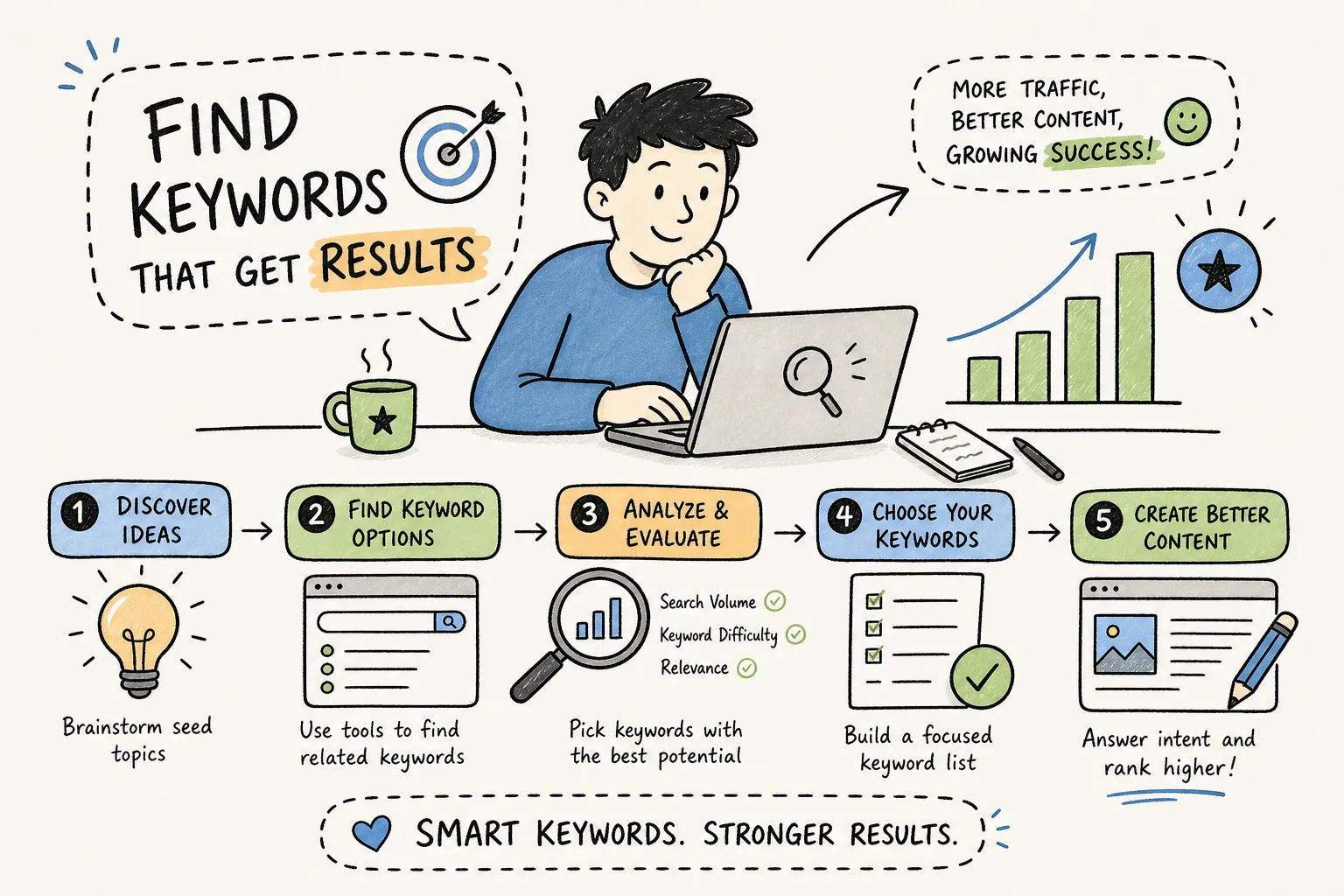
Before you run a single search, you need to understand four metrics. Search volume measures demand, how many times a keyword is searched per month. Keyword difficulty (KD) measures competition, usually shown on a 0, 100 scale. CPC (cost per click) signals commercial value: the more advertisers pay per click, the more likely that keyword drives buying decisions. Search intent tells you what the searcher actually wants: information, a specific site, product comparisons, or a purchase.
Why Volume Alone Misleads New Bloggers
Chasing volume is one of the first mistakes new bloggers make. A keyword with 30,000 monthly searches looks attractive until you check who’s ranking for it: major brands, news sites, and pages with thousands of backlinks. A keyword with 300 monthly searches and a KD of 15 is a far better target for a new site. Winning that smaller keyword actually gets you traffic; competing for the big one is unlikely to deliver meaningful traffic in the short term.
This is where long-tail keywords become your best friend. Long-tail keywords are longer, more specific phrases, think “best ergonomic desk chair for back pain under $300” instead of “office chair.” They typically carry lower KD scores, attract searchers with clearer intent, and convert at higher rates. For a new site, long-tail keywords are almost always the smarter entry point. For more tactical approaches and how to structure your early efforts, see our Best Keyword Research Strategies to Boost Your SEO, AISEO Round Table.
The Four Metrics and What They’re Actually Telling You
Here’s a quick “read it this way” for each metric:
- Search volume: Enough demand to be worth writing for, aim for 100, 1,000 searches/month as a new site.
- KD: Your difficulty rating, like a video game level, lower means more winnable. Target KD 0, 30 early on.
- CPC: A high number means buyers are in this space, useful for affiliate or product content.
- Intent: The content format Google expects, blog post, product page, or comparison guide.
Each metric answers a different question, and you need all four before deciding whether a keyword is worth your time.
How to Generate Seed Keywords for Your Niche
Seed keywords aren’t your final targets. They’re the raw starting material you feed into tools and Google to discover the actual keywords worth pursuing. A seed keyword for a home office blog might be “ergonomic desk” or “monitor setup”, broad topic areas, not specific article ideas. If you’d like a concise explainer of the concept, check what is a seed keyword.
The fastest way to build a seed list is to think about your site in terms of problems you solve and topics you cover. List 5, 10 broad subject areas, then break each into two or three sub-topics. That gives you enough seeds to generate a substantial keyword list without overthinking it at this stage. For a refresher on the fundamentals of keyword research and why this step matters, see Keyword Research: What It Is and Why It Matters, AISEO Round Table.
Starting with What You Already Know About Your Topic
Open a blank document and write down every broad topic your site covers. For a home office blog: desk setup, ergonomics, monitors, lighting, productivity. Then break each one down, “ergonomics” becomes back support, monitor height, keyboard placement. These sub-topics are your seeds. The goal is a working list of 15, 25 broad terms you can take into Google and keyword research tools.
Using Google to Expand Your Ideas Before Touching Any Tool
Google’s own surfaces are among the most reliable sources of keyword data available, and they cost nothing. Type a seed keyword into the search bar and capture the autocomplete suggestions, which reflect what real users type every day. Scroll to the bottom of the results page and collect the “related searches” section. Check the People Also Ask box for question-based variations. Google is literally showing you what searchers want, use it before you open any paid tool.
Keyword Research Tools: Free and Low-Cost Options for 2026
No single tool does everything, but you don’t need many to get started. The goal is to move from free keyword research tools that give you a baseline toward a low-cost option that adds the difficulty and intent data you need to make real decisions. Here’s how to think about the stack.
Free Tools That Cover the Basics
Start with these before spending a dollar:
- Google Keyword Planner, The foundation. It gives you search volume ranges and keyword suggestions pulled directly from Google’s own data, making it ideal for initial volume checks and expanding your seed list.
- Google Trends, Shows whether a keyword is growing or declining over time. That context matters when you’re deciding whether a topic is worth investing in now versus six months from now.
- AnswerThePublic, Takes a single seed term and generates dozens of question-based keyword ideas, which is ideal for building informational blog content around what people are actually asking.
Together, these three free keyword research tools cover volume, trend direction, and question-based discovery, a solid starting point before you commit any budget.
Why KWFinder and Mangools Work Well for New Sites
Once you’re ready to move beyond free tools, KWFinder is a commonly recommended next step for beginners who want KD scores and SERP-level insights. Unlike domain-level tools, it calculates keyword difficulty based on the actual pages ranking on page one, which gives you a more accurate read on what you’re up against for a specific query. It also displays search intent classification and a SERP breakdown showing what content types currently rank, so you know whether a blog post, a product page, or a comparison guide is the right format before you write a single word.
The pricing sits well below enterprise platforms like Ahrefs or Semrush, which makes it a practical choice for bloggers and small business owners watching their budgets. AISEO Round Table has published in-depth reviews and strategy guidance, see our Best Keyword Research Strategies to Boost Your SEO, AISEO Round Table for hands-on recommendations and comparisons before you choose a plan.
How to Read Keyword Difficulty and Search Intent
Finding keywords is the easy part. The harder skill is deciding which ones are actually worth targeting. That decision comes down to two filters: can you rank for it, and does the right content format match what Google is already serving for that query?
Realistic Difficulty and Volume Ranges for New Domains
For a brand-new domain, target KD 0, 30 as your primary zone. These are the keywords where smaller, newer pages can compete without a massive backlink profile. (Some guides recommend staying at KD 0, 20 for the very first posts on a new site, worth keeping in mind if your domain has zero history.) Once your site has some age and a few rankings, KD 31, 60 becomes more achievable, especially when your content quality is strong and the SERP isn’t locked up by major brands. On volume, the 100, 1,000 monthly searches range is the sweet spot: enough traffic to matter, realistic enough to win. For a deeper explainer of how search volume is measured and reported, see this guide on what search volume means and how it’s calculated.
Worth knowing: KD scores are tool-specific estimates, not guarantees. KWFinder calculates its score from the link profile strength of the actual ranking pages on page one, while Ahrefs and Semrush use their own proprietary models. Use KD as a first-pass filter, then check the real SERP to confirm who’s actually ranking before you decide. For an additional technical primer on keyword difficulty metrics and how they differ across tools, this resource is helpful.
Reading Search Intent from the Results Page
Intent tells you what Google expects to see ranking for a given query. Informational queries, those that include words like “how,” “what,” “why,” or “best way to”, typically return blog posts, guides, and tutorials. Transactional queries, which use words like “buy,” “price,” “near me,” or “order,” return product pages and local results. Navigational queries return brand-specific pages.
The fastest way to confirm intent is to search the keyword yourself and look at page one. If the top results are all how-to guides, write a how-to guide. If they’re product comparison pages, a blog post about the same topic is unlikely to rank well, regardless of how well it’s written. Featured snippets and People Also Ask boxes are strong signals of informational intent: if they dominate the SERP, Google is treating that query as a learning request, not a buying one. For a more detailed explanation of what search intent is and how to identify it, consult this guide, and for an AISEO Round Table angle on applying intent to content, see our Search Intent: The Key to Ranking Content, AISEO Round Table.
Building Your First Prioritized Keyword List
Now you turn that research into an actual content plan. The process is straightforward: expand, filter, score, group, and assign.
Filtering and Scoring Your Keyword Ideas
Start by removing anything irrelevant to your site’s focus, any competitor brand names, and any keywords where the intent clearly doesn’t match what your site can deliver. What remains gets scored on three factors: relevance to your audience, search volume in the 100, 1,000 range, and KD below 30 for a new site. A keyword that scores high on all three goes to the top of your list. A focused list of 20, 30 well-chosen keywords beats a bloated spreadsheet of 500 random terms you’ll never get around to.
Mapping Keywords to Pages and Building Your Content Plan
Assign one primary keyword per page or post. Use related keywords from the same topic cluster as supporting terms within that piece. Then arrange your list so the lowest-KD, highest-relevance keywords become your first articles. This isn’t just efficient, it’s strategic. Early rankings build site authority, and that authority makes it easier to rank for slightly harder keywords down the road.
Your prioritized list is now a content calendar. The first five or six items on that list become your first six posts. As those rank, you move up toward slightly more competitive terms. That’s how small sites grow sustainably without guessing.
Keyword Research for Beginners: Your Next Step
The scenario at the start of this guide, publishing a post that nobody finds, doesn’t have to be your story. Pick one seed keyword from your niche, run it through Google Autocomplete and Google Keyword Planner, find two or three low-KD long-tail variations, and write your first post. That’s the whole keyword research for beginners process in miniature, and it works.
Don’t wait until you have a perfect system. The best time to start is with the simplest version of this process: one keyword, one tool, one post. The precision comes with practice.
When you’re ready to go deeper, the AISEO Round Table reviews and strategy pieces walk you through exactly how to use tools and match content to intent, start with our Best Keyword Research Strategies to Boost Your SEO, AISEO Round Table and build from there. Use this keyword research for beginners process to plan your first six posts and start ranking, start there, build your list, and let the results follow.