You find a keyword you want to rank for, hit search, and stare at a wall of results: featured snippets, question boxes, map packs, video carousels, and ten blue links, all competing for the same screen. Most bloggers and small business owners see that page and have no idea what it means for their actual chances. So they write the content anyway, publish it, and wonder why nothing happens.
A proper SERP analysis changes that completely. This serp analysis guide shows you how to read results pages and spot ranking opportunities before you write a single word, the same way Google intended the SERP to be read: as a diagnostic tool that tells you exactly what intent it’s serving, which competitors are winning, and whether you have a realistic shot. At AISEO Round Table, this is the process we run before writing a single word of content, and this guide walks you through that same framework every time.
By the end, you’ll be able to look at any results page and immediately understand what it’s telling you about content format, competition level, click potential, and your best path to a ranking win.
What a SERP analysis actually covers
A SERP analysis is not the same thing as Googling a keyword to see who’s ranking. Casually searching a term tells you who shows up. A real analysis tells you why they show up and whether you can realistically displace them. It’s the difference between glancing at a scoreboard and actually watching the film.
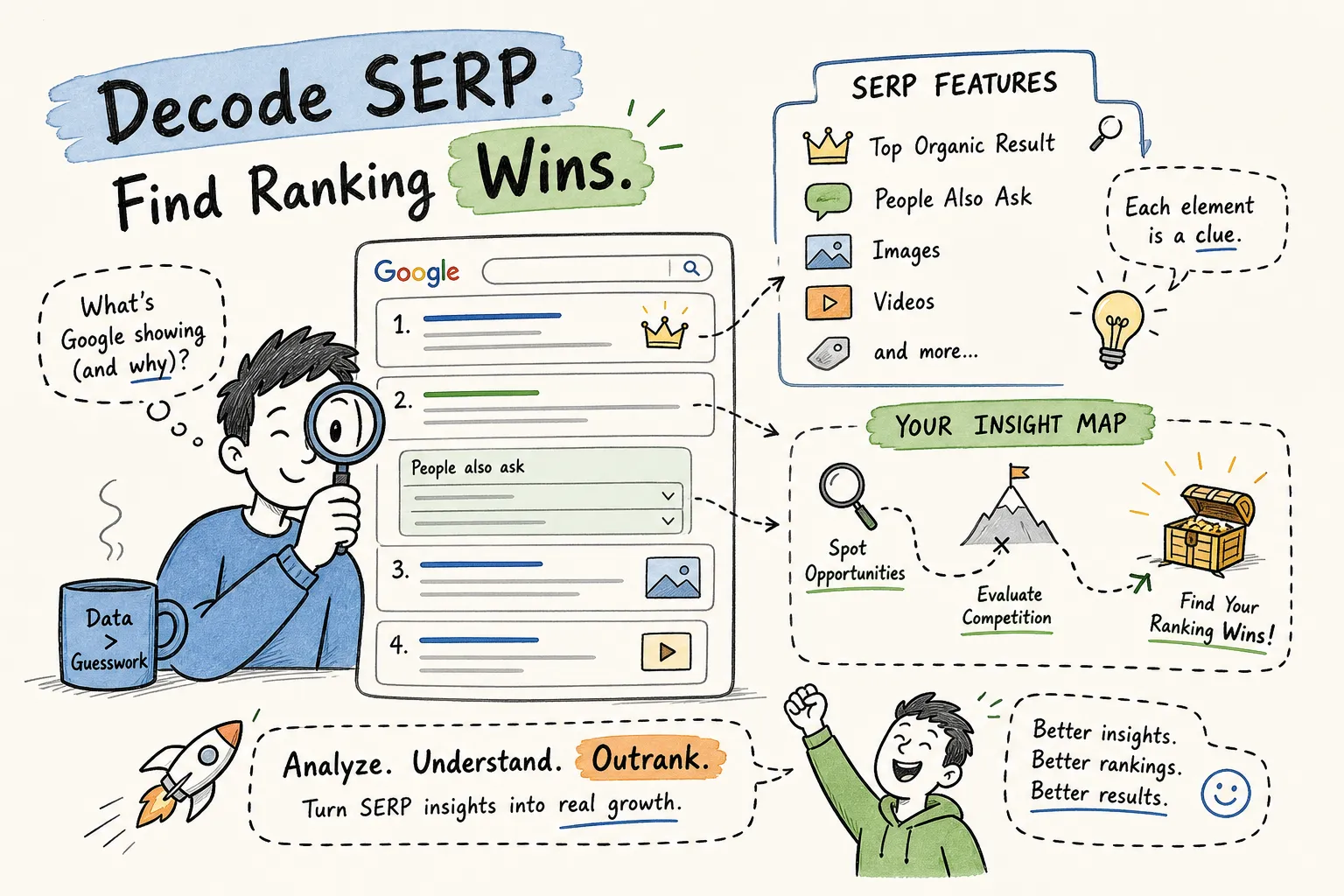
A thorough analysis covers five core questions, and the rest of this guide is built around them. What intent does Google assign to this query? Which SERP features are eating up the page and compressing organic click potential? Who’s currently winning and what makes them hard to beat? Where are the gaps the top results aren’t addressing? And what should your content do differently to compete? Answer all five and you walk away with an action plan, not just a list of observations.
How to read search intent directly from the results
Search intent isn’t something you guess from the keyword itself. The SERP tells you exactly what Google thinks users want for that query. All you have to do is read it. Look at the dominant result types: are they how-to guides, product pages, comparison articles, or branded homepages? That pattern is Google’s answer key for what type of content belongs on page one.
The four intent types and what they look like
Informational queries surface blog posts, how-to guides, definitions, and explainer articles. Commercial queries produce comparison pages, best-of lists, and review articles. Transactional queries show product pages, category pages, and retailer listings. Navigational queries return a specific brand’s homepage or site. Each intent type looks distinctly different on a live results page, and a quick scan of the top five results is usually all it takes to identify which one you’re dealing with.
Why intent mismatch ends your ranking chances early
Intent mismatch greatly reduces, and in most cases prevents, your content from ranking. If nine of the top ten results are long-form blog articles and you publish a product page, you’re not answering the question Google has already decided the user is asking. Strong authority signals can sometimes soften the impact of format mismatch, but the research on intent alignment consistently shows it’s the first filter Google applies. Intent alignment is therefore the first thing to check before you invest a single hour in content creation. Get this wrong and even technically excellent content struggles to gain traction.
SERP features that reshape your traffic potential
This is where keyword research alone misleads you. A keyword can show 5,000 monthly searches and still deliver almost no organic traffic if the results page is dominated by features that answer the query without requiring a click. Understanding what’s sitting above the first organic result is essential for estimating the realistic traffic value of any ranking.
Featured snippets, People Also Ask, and knowledge panels
Featured snippets appear on roughly 12% of Google queries overall, and they tend to cluster around informational searches where a direct, concise answer exists. Winning a featured snippet can generate significant visibility without holding the top blue-link position, but it also means formatting your content with a clear, tight answer block early in the article. People Also Ask boxes signal that the query carries several sub-questions worth addressing in your content; each expanded PAA question is essentially a free content brief.
Knowledge panels are a different story. They appear for entity-based queries, people, brands, locations, and generally signal low click opportunity for third-party sites since Google is surfacing the answer directly on the page. If you see a knowledge panel dominating the right column for your target keyword, factor that into your traffic ceiling estimate before committing to the topic.
Local packs, shopping results, and video carousels
Local packs strongly favor location-based results, and for non-local content they make those keywords significantly harder to win, often regardless of content quality. If you see a map pack for your target keyword, reconsider whether that query fits your content strategy. Shopping results signal transactional intent, meaning Google wants product listings, not editorial content. Video carousels indicate a strong visual or demonstration component where YouTube competes directly with text pages; text-only content can still rank depending on intent and authority, but the competition from video results makes top positions harder to reach.
Estimating zero-click risk before you commit to a keyword
Before targeting any keyword, count how many features sit above the first organic result. A page with a featured snippet, a PAA block, a knowledge panel, and two rows of ads before organic listing number one means the realistic organic click share is dramatically compressed. In our own testing, we’ve seen organic CTR drop by more than 60% on queries with AI Overviews active. That doesn’t mean you never target these keywords, but it does mean you need to weigh the traffic ceiling against the content investment required.
Gauging keyword difficulty and competitor strength
Once you understand the intent and the feature landscape, you need to evaluate whether the pages currently ranking are actually beatable. Keyword difficulty scores give you a starting point, but reading the top 10 results directly gives you the full picture.
Authority signals worth examining in the top results
The two most predictive signals of ranking difficulty are referring domain counts and domain authority proxies like DA or DR. A top 10 filled with high-authority sites carrying thousands of referring domains signals a hard keyword regardless of what the difficulty score says. But a top 10 where several results come from mid-authority sites with thin backlink profiles is a real opportunity, even if the surface KD score looks intimidating. At AISEO Round Table, we tell new blogs to stay under a keyword difficulty score of 30, and ideally under 20, to build early traction before going after more competitive targets.
Spotting content gaps that signal a real ranking opportunity
Read the top results for what they don’t cover: missing subtopics, unanswered questions surfacing in the PAA box, outdated data, shallow formatting, or a mismatch between what the title promises and what the article actually delivers. These gaps are where newer sites win by being more specific, more thorough, or more accurately aligned with the actual query. A well-researched article from a mid-authority site that fully answers the question will often outperform a thin piece on a high-authority domain. The SERP gap is your competitive edge.
Running your SERP analysis with SERPChecker
Doing all of this manually is possible but slow. You’d be toggling between a live Google search, a backlink tool like Serpstat, All-in-One SEO Platform for Keyword Research, Competitor Analysis, and Website Optimization, AISEO Round Table, an authority checker, and a spreadsheet just to gather the baseline data. SERPChecker by Mangools brings together the core signals covered in this guide on a single screen: live SERP feature flags, keyword difficulty, domain authority and page authority for each ranking URL, estimated traffic, and backlink counts for every result in the top 20.
What SERPChecker shows you at a glance
When you enter a keyword, SERPChecker surfaces a SERP snapshot with every detected feature flagged directly in the interface, including featured snippets, answer boxes, image packs, map packs, knowledge graphs, carousels, top stories, sitelinks, and sponsored results. Each ranking URL displays its domain authority, page authority, estimated monthly traffic, and link count alongside the title and meta snippet. The tool also shows a SERP Features Impact score on a 1 to 5 scale so you can quickly assess how much those features are suppressing organic click share.
The AISEO Round Table workflow for a first-time SERP check
Here’s the process we follow at AISEO Round Table: enter the keyword, read the SERP feature flags first, note the KD score, scan the domain authority and referring domain columns for obvious outliers, extremely high or surprisingly low, and then look at the title column to confirm the content format Google is rewarding. For users comfortable with the interface, a focused check can take as little as five minutes per keyword, though a deeper competitive read naturally takes longer. We’ve published a detailed SERPChecker review that walks through the full tool interface and feature detection capabilities, so head there if you want a hands-on walkthrough before committing to a plan.
Turning your SERP findings into a ranking action plan
Here’s where most people stop short, they do the analysis and then default back to whatever they were already planning to write. The entire point of reading the results page is to make better decisions about what to create, how to format it, and how to measure whether your work is producing movement. This section covers both of those decisions.
Content and format decisions the SERP tells you to make
The SERP is Google’s answer key, and your job is to execute it better than the current winners. If the top results are long-form guides, write a long-form guide. If PAA boxes surface six specific questions that nobody in the top 10 is answering well, build dedicated sections around those questions. If a featured snippet exists and the current winner uses a short paragraph definition, format a tight direct-answer block at the top of your content to compete for that position. The format isn’t something you choose freely; it’s something the SERP assigns, and the closer you match it while adding genuine depth, the better your chances.
Setting up simple tracking to measure your progress
After publishing or updating your content, record your current rank (or confirm you’re not ranking yet), note which SERP features were present during your initial analysis, and set a reminder to recheck in 60 to 90 days. Use a rank tracker alongside Google Search Console impressions data to build a before-and-after picture of whether the analysis translated into real movement. Impressions rising before clicks is a well-documented early signal that your content is entering the conversation and that ranking movement often follows. Track the SERP features again on the recheck date because a new featured snippet or PAA appearance on your URL is a win worth documenting.
Serp analysis guide: quick checklist before you write
Use this checklist as your pre-writing reference every time you evaluate a new keyword:
- Intent check: What content format dominates the top five results? Match it.
- Feature audit: Count the SERP features above the first organic result. How compressed is the click potential?
- Zero-click risk: Is there an AI Overview, featured snippet, or knowledge panel eating the query? Factor that into your traffic estimate.
- Competitor strength: Are the top-ranking pages from high-authority domains with deep backlink profiles, or are mid-authority sites holding positions?
- Content gaps: What are the top results missing, unanswered PAA questions, outdated data, shallow subtopics?
- Format decision: What length, structure, and format does the SERP signal? Commit to it before you outline.
Conclusion: your results page is your content brief
Every serp analysis guide comes back to the same five questions: what intent is Google serving, what features are reshaping the click landscape, who is winning and why, where are the gaps, and what does your content need to do differently? Answer all five before you write, and you stop wasting time on content that was never going to rank in the first place.
The biggest unlock for beginner bloggers and small business owners is realizing that the results page itself tells you almost everything you need to know about what to create and how hard it will be to compete. You don’t need to guess; you just need to know how to read it. SERPChecker by Mangools makes that process fast and accessible, pulling the core signals covered in this guide into one screen. Check out the full AISEO Round Table SERPChecker review for a complete walkthrough of the tool and its current Mangools plan options.
Run your first full SERP analysis on your next target keyword before you write a single word. Use this serp analysis guide as your pre-writing checklist to prioritize the right keywords and formats, and once you work through it once, you’ll never approach a new keyword the same way again.