You spent hours on a piece of content. You found what looked like a solid keyword, wrote a thorough article, hit publish, and checked your rankings a week later. Page 3. Maybe page 4. It’s one of the most common frustrations we hear from new readers at AISEO Round Table, and almost every time, the missing step is the same: nobody looked at the search results page before writing a single word.
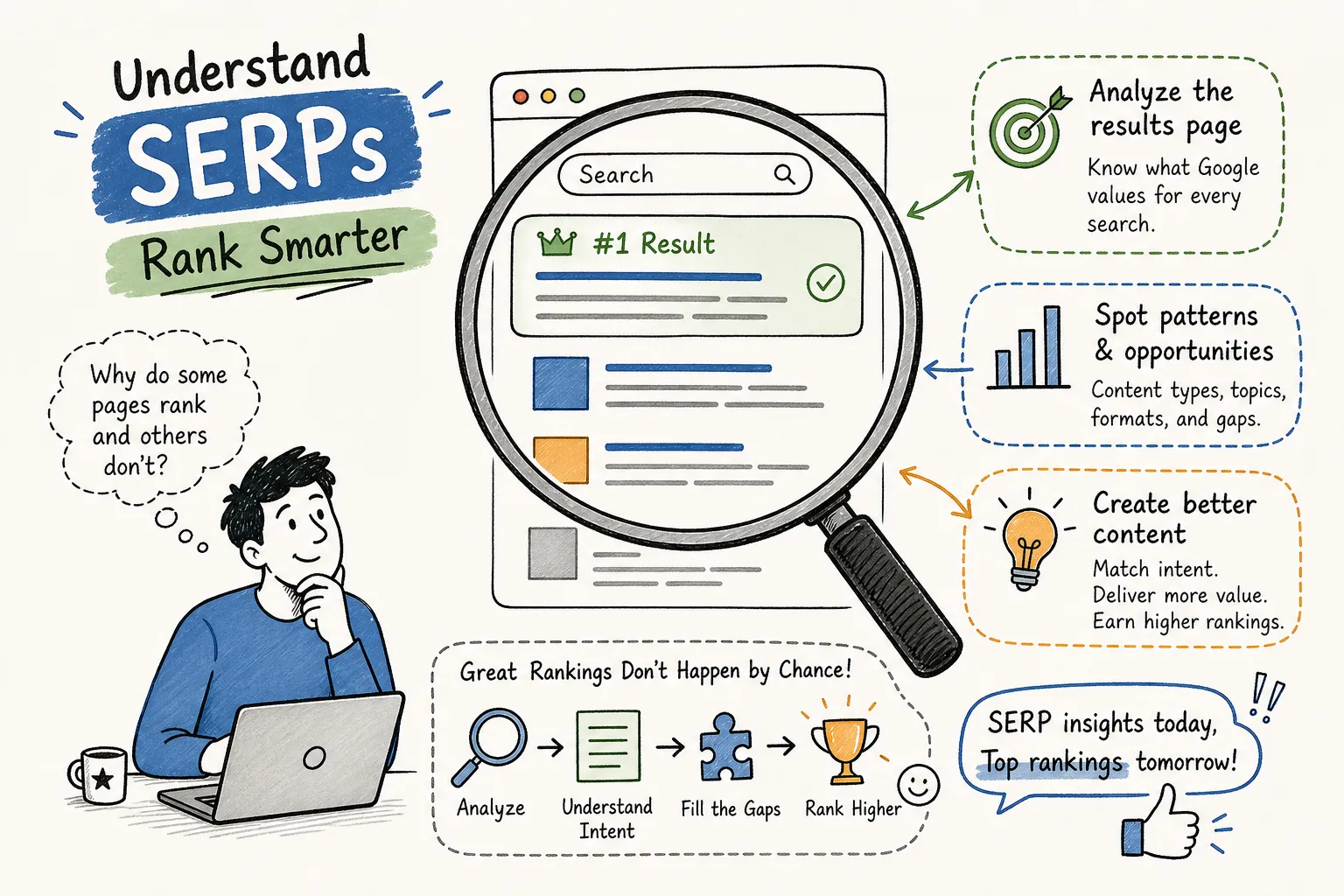
So what does SERP analysis mean, and why does it matter so much for rankings? At its core, SERP analysis is the practice of studying what Google is already rewarding for a query before you create or revise content. When you search a keyword and examine the results, you’re reading a signal. Google is telling you exactly what it considers the best answer. Ignore that signal and you’re writing in the dark. Read it carefully and you have a blueprint.
This guide covers everything you need to get started: a plain-English definition, the SERP features you need to recognize, a step-by-step audit workflow you can run in under 20 minutes, the tools that make it easier, and how to turn your findings into content decisions that actually move rankings.
What Does SERP Analysis Mean and Why Does It Matter?
Strip away the jargon, and SERP analysis is just the practice of studying a Google search results page for a specific keyword to understand what content is ranking, why it’s ranking, and whether you have a realistic shot at competing. Think of it as reading the room before you speak. Google has already reviewed every piece of content on the internet and decided what deserves to show up first. Your job is to understand that decision before you try to influence it.
A SERP audit is the more structured version of the same process. Where a quick glance might tell you who’s ranking, a full audit means systematically capturing data: content types, SERP features present, competitor metrics, and content gaps. The output is a clear picture of the SERP landscape for a keyword, which becomes the foundation of any smart content or SEO decision you make.
The anatomy of a search results page includes more than the standard blue links. There are paid ads at the top and bottom, organic listings in between, and a growing set of SERP features: featured snippets, People Also Ask boxes, image packs, video carousels, local business packs, knowledge panels, and in 2026, AI Overviews sitting above it all. The specific mix of those elements is itself a signal. A results page packed with product listings and shopping ads tells a completely different story than one full of how-to guides and question-based boxes.
Why SERP Analysis Matters Before You Write a Single Word
The top five results for any keyword answer one critical question: what does the searcher actually want? This is search intent analysis in its most practical form. Look at the dominant format across those results and the intent becomes obvious. If nine of the ten top results are long-form blog articles, Google is treating that keyword as informational. If the top results are product pages with prices and add-to-cart buttons, the intent is transactional. Writing the wrong page type for a query means working against what Google has already decided, and Google rarely budges on format preferences.
The four common intent types are informational (the user wants to learn), navigational (the user wants a specific site), commercial (the user is comparing options), and transactional (the user is ready to act). You don’t need to memorize definitions. The SERP makes the intent visible. Titles, meta descriptions, the types of sites ranking, and the SERP features present will tell you which category applies within the first 60 seconds of looking.
The second reason to analyze the SERP before writing is competitive reality. When you look at the top-ranking pages through a SERP competitor analysis, you can gauge domain authority, estimated backlink counts, and how recently those pages were updated. If position one is held by a nationally recognized publication with thousands of referring domains, a brand-new blog post from your site probably isn’t displacing it next month. That context doesn’t mean you avoid the keyword forever; it means you find a less contested variation first, build momentum there, and come back with more authority behind you. Skipping this step is why new bloggers spend weeks on content that has no realistic near-term chance of ranking.
The SERP Features Every Beginner Needs to Recognize
A featured snippet is the direct-answer box pulled from a ranking page and displayed above the organic listings. When one appears, it almost always signals an informational query. Someone typed a question, and Google is trying to answer it immediately. For you as a content creator, a featured snippet is both an intent signal and an opportunity: structured, direct writing that answers a question concisely is exactly the kind of content that earns snippet placement.
People Also Ask boxes serve a dual purpose. On one side, they show you how Google categorizes the related questions real users are asking around your keyword. On the other side, each PAA answer is a ranking opportunity separate from the standard organic listings. If you’re writing an article on a topic with an active PAA section, those questions are subtopics you should cover. Answering them thoroughly in your content gives you a realistic shot at appearing in that box, which can drive meaningful clicks even if you’re not in position one.
Beyond snippets and PAA boxes, several other features reshape how a results page behaves. Local packs appear when Google detects location-based intent. Image packs, video carousels, and shopping results each signal that a portion of users prefer a specific content format. If a video carousel shows up at position three for a keyword you’re targeting with a text article, that’s a data point worth logging. It signals that a meaningful portion of users prefer video for this query, which might mean embedding a video in your article or flagging it for your content roadmap. Each feature type maps to a specific user need, and overlooking them means missing part of the picture.
How to Run a Simple SERP Audit Step by Step
Start by opening an incognito browser window. This reduces the personalization effect that comes from your browsing history, giving you a cleaner view of what an average searcher sees. Search your target keyword, then work through the top ten organic results without clicking anything first. Log the dominant content type across positions one through five: are they guides, listicles, comparison pages, forum threads, or tool pages? Note which SERP features appear and read the title tags and meta descriptions before you click through.
Keep a simple worksheet for this process. A spreadsheet with columns for keyword, intent type, dominant content type, features present, and content gaps spotted is all you need. Once you have the SERP-level data captured, click into the top three to five organic results and review the actual pages. Note how deep the content goes, which subtopics it covers, when it was last updated, and what questions it leaves unanswered. Those unanswered questions are your content gaps.
Gap-spotting is where the audit becomes actionable. A gap might be a missing section that searchers clearly need, an outdated example that no longer applies, a format mismatch like a wall of text where step-by-step screenshots would serve the reader better, or a lack of FAQ content despite active People Also Ask boxes on the SERP. Map each gap to a specific action: add a section, restructure the introduction, create a supporting FAQ, or change the format entirely. This whole process runs in 15 to 20 minutes per keyword once you’ve done it a few times.
Tools That Make Reading the Search Results Much Easier
A manual audit in an incognito window costs nothing and is the right starting point for anyone running occasional checks on a handful of keywords. You open the SERP, read the results, click through to competing pages, and take notes. One real limitation of the manual approach is that it gives you no historical data and no bulk lookup capability, you’re working with a single snapshot at a single point in time. For infrequent use on a tight budget, a browser and a basic spreadsheet are genuinely enough to get started.
Where a dedicated SERP checker tool earns its cost is when you’re analyzing multiple keywords at once, need accurate competitor metrics, or want to track how results change over time. Mangools SERPChecker is a practical option for bloggers and small business owners who want structured data without a steep learning curve. It pulls the top-ranking pages for any keyword and displays 45-plus metrics in a single view: domain authority, page authority, backlink counts, referring domains, estimated traffic, and which SERP features are active for that query.
The tool also supports local SERP analysis, which matters for any keyword with location-based intent. Pricing sits well below enterprise-level platforms, making it a realistic choice for anyone managing their own site without an agency budget. Other platforms like Ahrefs and Semrush offer deeper data for SERP competitor analysis, particularly around backlink profiles and historical ranking behavior. They’re worth considering as your site grows and your budget follows. For most bloggers and small business owners just building their SERP analysis habit, starting with a focused tool and upgrading later is the more practical path.
Turning Your SERP Findings into a Content Action Plan
The most important output of any SERP audit is format alignment. If the top five results are all step-by-step guides with numbered headers and screenshots, publishing a short opinion piece for that same keyword is a format mismatch. Google has made it clear what structure it rewards for that query. Your job is to match that structure while going deeper, being clearer, or covering angles the current top results miss.
SERP analysis also tells you when to update rather than publish. If you already have a page on a topic but it’s sitting on page two or three, pull up the SERP and compare your page against the current top results. Outdated examples, thin coverage of subtopics, or an introduction that doesn’t match the dominant search intent are all fixable problems. Updating an existing page is often faster than writing something new, and fresh improvements to pages that already have some history tend to get noticed.
Your first audit will surface a handful of immediate moves worth making. Add a FAQ section built from the People Also Ask questions you find on the results page, those questions represent real user demand, and answering them in a structured FAQ is one of the fastest ways to pick up PAA placements. Update your title tag and introduction to reflect the dominant intent signaled by the top results; if everyone ranking at the top frames the topic as a “beginner’s guide,” your introduction should speak to beginners directly. Finally, pick one content gap from your competitor review and add a missing subtopic to an existing post. A single added section that answers a question the top results skip can be enough to move a page from position eight to position four.
Make SERP Analysis a Habit, Not a One-Time Task
Understanding what SERP analysis means is only part of the equation, the other part is doing it consistently. Search results evolve. New competitors enter the space, featured snippets change hands, and SERP features appear or disappear as Google refines how it interprets intent for a query. The SERP landscape for a keyword you researched six months ago may look meaningfully different today. Building a habit of checking the SERP before creating and after publishing gives every other part of your SEO process more accuracy.
The barrier to entry is low. An incognito browser, a simple worksheet, and a tool like Mangools SERPChecker are enough to run a solid first audit. You don’t need a technical background or an agency. You need a process, the willingness to look at the search results before you write, and the discipline to let those results shape your content decisions.
That’s why SERP analysis matters: it turns guesswork into a repeatable system. Pick one keyword you’re currently targeting, open an incognito window, and spend 20 minutes working through the process described here. Write down what you find. That single audit will tell you more about what does SERP analysis mean and why does it matter for your content strategy than hours of guessing ever could, and it puts you well ahead of anyone who skips the step entirely.