
A client-ready SEO audit report template needs eight sections: an executive summary, a scorecard, technical, on-page, content, off-page, local (if relevant), and a prioritised action plan with impact and effort ratings. Below is the free Google Sheets version I use for agency audits, plus a section-by-section breakdown of what to check, which tools to run, and what to actually write in each tab.
Get the free SEO audit report template (Google Sheets)
Open the sheet, then go to File → Make a copy to get an editable version in your own Drive. No email gate, no sign-up.
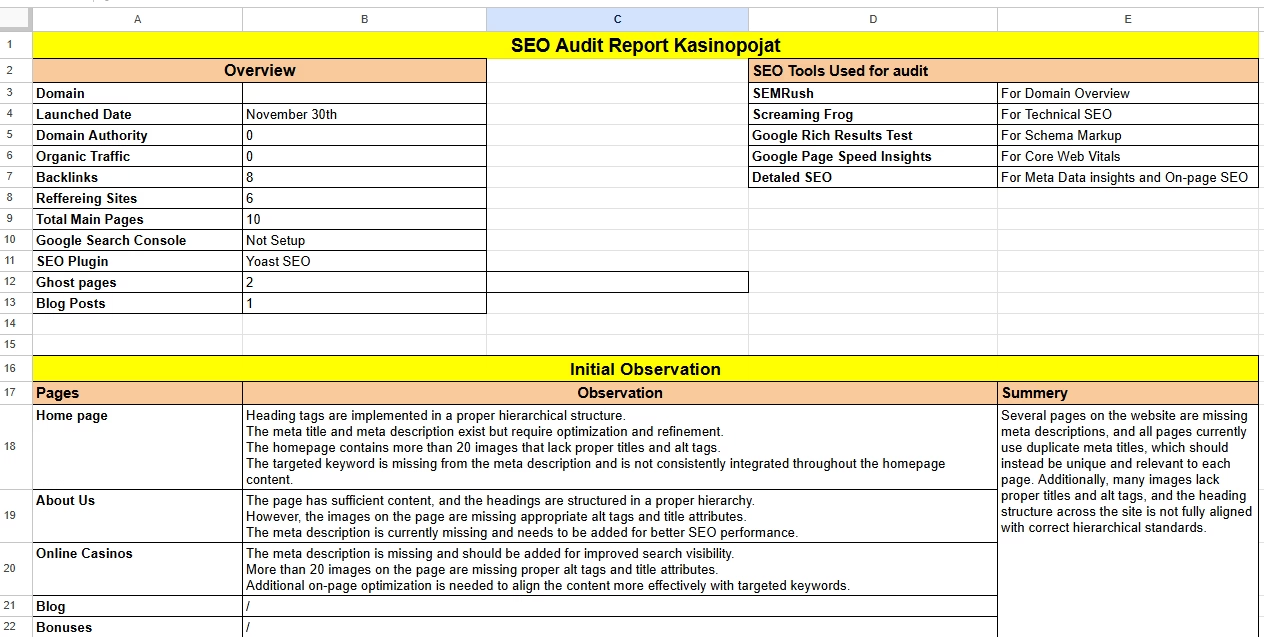
- A good audit report is a decision document, not a data dump. The executive summary and action plan are the only tabs most clients read fully.
- Score every issue P1/P2/P3 by traffic at risk and effort to fix, then group into a 90-day plan.
- Free tools cover 80% of an audit: Screaming Frog (500-URL free crawl), Google Search Console, PageSpeed Insights and Rank Math’s SEO Analyzer.
- Export the summary tab to PDF straight from Google Sheets; keep the raw crawl data in the same file for backup.
What a client-ready SEO audit report must contain
Every audit I have delivered since 2019 has followed the same skeleton, whether it was for a 40-page dental clinic or a 90,000-URL ecommerce catalogue. The size changes; the sections do not.
- Executive summary – three to five sentences on the site’s health, the biggest risk, the biggest opportunity, and what happens in the next 90 days.
- Scorecard – one score per area (technical, on-page, content, off-page, local) on a 1–10 scale, plus the number of P1/P2/P3 issues found.
- Technical SEO – crawlability, indexation, Core Web Vitals, redirects, canonicals, structured data, XML sitemaps, robots.txt.
- On-page SEO – title tags, meta descriptions, heading structure, internal linking, image alt text, keyword targeting per URL.
- Content – thin pages, cannibalisation, outdated posts, search-intent mismatch, coverage gaps against competitors.
- Off-page – referring domain trend, toxic link exposure, anchor text profile, competitor link gap.
- Local SEO – Google Business Profile completeness, NAP consistency, reviews, local landing pages. Skip this tab for national SaaS or publishers.
- Prioritised action plan – every finding as a row with owner, impact, effort, priority and target date.
If you only fix one thing about your current SEO audit report format, make the action plan a live table rather than prose. Clients forward tables to developers; they do not forward paragraphs.
SEO audit report template sections: what to check, tools, and what to write
This table is the spine of the template. Each row maps to a tab in the sheet.
| Section | What to check | Tools (as of September 2026) | What to write |
|---|---|---|---|
| Executive summary | Overall health, top 3 risks, top 3 wins, 90-day outcome | Everything below, condensed | Plain-English paragraph a CEO can read in 60 seconds. No jargon, no screenshots. |
| Scorecard | Score per area, issue counts by priority | Template formulas (auto-calculated) | One line of context per score, e.g. “Technical 4/10 – 38% of product URLs not indexed”. |
| Technical | Index coverage, crawl errors, redirect chains, canonicals, CWV, sitemaps, robots.txt, HTTPS, hreflang | Screaming Frog (free up to 500 URLs, $279/yr for unlimited), Google Search Console, PageSpeed Insights, Ahrefs or Semrush Site Audit | Issue, affected URL count, example URLs, why it matters, fix instruction, priority. |
| On-page | Missing/duplicate titles, title length, H1 count, meta descriptions, alt text, internal link depth | Screaming Frog, Rank Math SEO Analyzer (free), Search Console Performance report | Table of URLs with current vs recommended title and description for the top 20 money pages. |
| Content | Thin pages (<300 words on commercial pages), cannibalisation, decay, intent mismatch, gaps | Search Console (query-to-page mapping), Ahrefs Content Gap, Semrush Keyword Gap | Consolidate / update / delete recommendation per URL cluster, with target keyword. |
| Off-page | Referring domains trend, lost links, anchor text ratio, toxic domains, competitor gap | Ahrefs Site Explorer (Lite $129/mo), Semrush Backlink Audit (Pro $139/mo), Search Console Links report (free) | Link velocity vs top 3 competitors and a list of 10 realistic link targets. |
| Local | GBP categories, hours, photos, reviews, citations, local pages, LocalBusiness schema | Google Business Profile, Rank Math local schema, manual citation check | Completeness checklist with yes/no per item and screenshots of competitor GBP listings. |
| Action plan | All findings above | Template tab with dropdowns | One row per fix: issue, owner, impact (1–5), effort (1–5), priority, due date, status. |
Prices above are list prices verified in September 2026. Screaming Frog’s free tier caps crawls at 500 URLs, which is enough for most small business sites; the paid licence removes the cap. Ahrefs Webmaster Tools also gives free Site Audit access for a domain you have verified, which is useful when you are auditing your own site rather than a prospect’s. For a fuller cost comparison see Ahrefs vs Semrush.
How to score issues as P1, P2 or P3
An SEO audit template without a scoring rule produces 140 “critical” issues and a client who does nothing. The template uses two 1–5 inputs per row, impact and effort, and calculates priority from them.
- Impact 5 – blocks indexing or crawling of revenue pages (noindex on category pages, robots.txt blocking /products/, sitewide 5xx).
- Impact 4 – suppresses rankings on money pages (duplicate titles on top 20 URLs, failing Core Web Vitals on mobile, cannibalisation between two service pages).
- Impact 3 – hurts a section, not the site (redirect chains on blog, missing alt text, orphaned pages).
- Impact 2 – hygiene (meta descriptions over 155 characters, mixed-case URLs).
- Impact 1 – cosmetic (missing favicon, trailing slash inconsistency with correct canonicals).
Effort runs the other way: 1 is a settings toggle in Rank Math or Yoast, 5 is a developer sprint or a site migration.
The priority formula in the sheet: P1 = impact 4–5 and effort 1–3; P2 = impact 4–5 with effort 4–5, or impact 3 with any effort; P3 = impact 1–2. That rule pushes cheap, high-impact fixes to the top and stops “rebuild the site on a new CMS” from being labelled urgent.
Turning findings into a 90-day plan
Once every row has a priority, the 90-day tab groups them into three sprints. This is the part of the report that gets acted on, so it needs owners and dates, not just recommendations.
- Days 1–30: P1 fixes. Indexation blockers, broken canonicals, sitewide title issues, 404s on linked pages, and anything failing in Search Console’s Page indexing report. Most of these are config changes an SEO can do without a developer.
- Days 31–60: P2 fixes and quick content wins. Rewrite titles and descriptions on the top 20 pages, merge cannibalising posts, fix Core Web Vitals on templates rather than individual pages, tighten internal linking to money pages.
- Days 61–90: P3 and growth. Content gap pieces, link outreach to the 10 targets from the off-page tab, local landing pages, schema roll-out.
Set a measurable check-in at day 90: indexed page count, clicks on the top 20 URLs, and CWV pass rate from the Search Console Core Web Vitals report. Anything you cannot measure in Search Console should not be in the summary as a promised outcome.
Presenting the report: PDF export from Google Sheets
Clients ask for an SEO audit report PDF, and Sheets handles that without a design tool.
- Hide the raw data tabs (Crawl export, GSC export) by right-clicking the tab → Hide sheet. Keep Summary, Scorecard and Action Plan visible.
- Go to File → Download → PDF. Set Export to “Workbook”, Paper size A4, orientation Landscape, Scale “Fit to width”.
- Under Formatting, tick “Show gridlines” off and “Repeat frozen rows” on so the table headers repeat on every page.
- Name the file ClientName-SEO-Audit-2026-09.pdf. Date in the filename saves arguments later about which version was sent.
Send the PDF for the record, but share the Sheet link with comment access as the working document. The action plan tab with status dropdowns becomes the project tracker, which is why I stopped building audit decks in slides years ago.
Template walkthrough, tab by tab
The Google Sheets template has nine tabs. Here is what each one expects from you.
1. Summary
Client name, site URL, audit date, auditor, and the executive summary text box. The three “top risks” and “top opportunities” cells pull from the Action Plan tab, so fill that first.
2. Scorecard
Enter a 1–10 score per area. Issue counts by priority are COUNTIF formulas against the Action Plan; do not overwrite them.
3. Technical
Paste your Screaming Frog “Issues” export in the raw tab and log the ones that matter here. Columns: issue, URL count, example URL, source tool, recommendation, impact, effort, priority (auto).
4. On-page
Top 20 URL table with current title, current description, recommended title, recommended description, target keyword. Use the title tag guidance for lengths: titles under 60 characters, descriptions 140–155.
5. Content
URL cluster, issue type (thin / cannibalised / decayed / mismatch), evidence (Search Console clicks last 12 months vs previous 12), recommendation. Map every cluster to a single search intent.
6. Off-page
Referring domains for the client and three competitors, links lost in the last 90 days, anchor text split (branded / exact / generic), and 10 outreach targets with the reason each is realistic.
7. Local
Yes/no checklist for Google Business Profile completeness and citation consistency. If the client is not local, delete the tab; do not leave it blank. The local SEO audit guide covers the full checklist.
8. Action plan
Every finding from tabs 3–7 as one row. Dropdowns for owner (SEO / Dev / Content / Client), status (Not started / In progress / Done), and 90-day sprint (1 / 2 / 3).
9. Raw data
Crawl export, Search Console export, backlink export. Hidden before PDF export, kept for the audit trail.
Common mistakes I see in SEO audit reports
In audits I have reviewed from other agencies while onboarding clients at Caliberon, the same failures show up regardless of how expensive the report was.
- Pasting the tool’s health score as the verdict. A Semrush site health of 82% tells the client nothing about revenue. Translate it: “the 12 category pages that drive 70% of organic clicks all fail mobile CWV”.
- Listing every issue at equal weight. Two hundred rows of “meta description too long” bury the one noindex tag on the pricing page. Score, then sort.
- No example URLs. “Duplicate titles found (312)” is unactionable. Give three examples and the export filename.
- Recommendations without owners. If the fix needs a developer, say so in the row. The client’s team will not work it out on their own.
- Skipping the “what changed since last time” line. For repeat audits, the first paragraph should compare against the previous scorecard, not restart from zero.
- Ignoring AI search. As of September 2026, an audit that does not note whether the site is cited in AI Overviews for its head terms is missing a real traffic line. Add one row to the content tab for it.
For the technical checks themselves, the technical SEO checklist pairs with the Technical tab; Google’s own SEO Starter Guide and the Page indexing report documentation are the two external references I link inside client reports when they question a recommendation.
The free SEO audit report download is here again: SEO audit report template (Google Sheets). Make a copy, delete the tabs you do not need, and fill the Action Plan before anything else.
FAQ
What should an SEO audit report include?
An executive summary, a scorecard, technical, on-page, content and off-page findings, a local section where relevant, and a prioritised action plan with impact, effort, owner and due date for every issue.
How long should an SEO audit report be?
The client-facing PDF should be 8–15 pages. Keep raw crawl data in hidden tabs of the sheet rather than in the PDF. If the summary and action plan do not fit on two pages, the prioritisation is not finished.
Can I do an SEO audit for free?
Yes, for sites under 500 URLs. Screaming Frog’s free version, Google Search Console, PageSpeed Insights and Rank Math’s free SEO Analyzer cover technical and on-page checks. Backlink analysis is the main gap; Ahrefs Webmaster Tools fills it for your own verified domain.
Is there an SEO audit report sample I can look at?
The Google Sheets template linked above includes sample rows in each tab showing the expected level of detail: issue, example URLs, tool source, recommendation and priority. Replace them with your own findings.
How often should I run an SEO audit?
A full audit once a year or after any migration, redesign or major Google update, plus a lighter technical check quarterly. See recovering from a Google update for the post-update version of the process.